Target audience: QA engineers, test‑automation specialists, and development teams that use the n8n Community Edition (CE) to orchestrate integrations.
1. Why a focused testing strategy matters
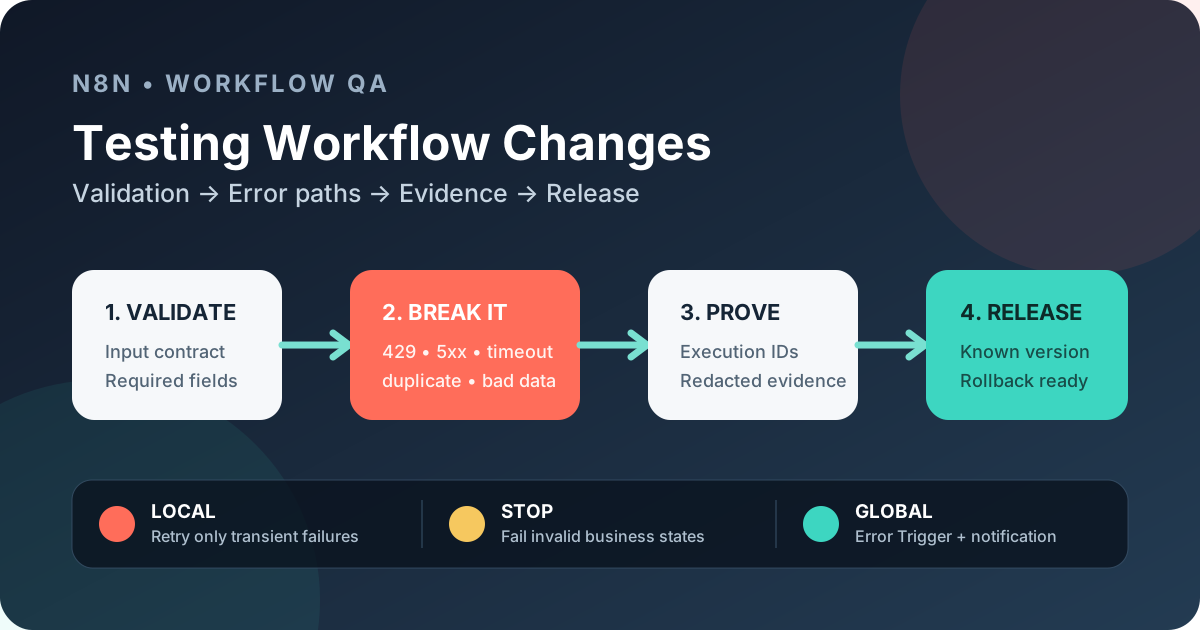
When a single workflow is modified—e.g., a new API call is added or a data‑mapping rule changes—the impact can ripple through downstream processes. n8n's native Git-based source control and environments are plan-specific rather than Community Edition features. Community teams can still create a reviewable safety net by exporting a workflow, versioning that export in Git, and running a disciplined test suite before promotion. The guide below concentrates on a concrete pattern that many teams already use: a parent workflow that validates its input contract, invokes a focused sub‑workflow, and then checks the output contract. The pattern is reinforced by three layers of error handling:
- Validation – early rejection of malformed data.
- Local error handling – retry only for transient failures.
- Global error workflow – centralized notification and audit.
All three layers are documented in the n8n error‑handling guide [1] and can be assembled with native nodes (If, Stop And Error, Retry On Fail, Error Trigger). The QA approach described here builds on that documented behavior and adds practical test design, idempotency safeguards, and release‑evidence artifacts.
2. Architecture in practice
Parent Workflow
│
├─ Validate input contract (If node)
│   └─ Stop And Error → abort on missing/malformed fields
│
├─ Call Sub‑workflow (Execute Workflow node)
│   └─ Local Retry On Fail (timeouts, 429, selected 5xx)
│
└─ Verify output contract (If node)
    └─ Stop And Error → abort on contract mismatch
If the workflow execution fails, its configured Error Trigger workflow receives the documented error payload and can post a notification. Treat that payload as sensitive: select only the workflow name, execution URL or ID when available, last executed node, and a sanitized error message. The global workflow is reusable across the organization, so the same audit format is applied to every failure.
3. Building the parent workflow
3.1 Input validation with an If node
When to reject:
- Required fields are missing (
nullorundefined). - Data types do not match the contract (e.g., a string where a number is expected).
- Business‑rule constraints are violated (e.g., a date outside an allowed range).
The If node should evaluate a logical expression that returns false for any of the above conditions. Connect the false branch to a Stop And Error node with a clear message such as “Input validation failed – missing customerId”.
3.2 Deliberate failure with Stop And Error
Use Stop And Error only for conditions that are not expected to recover automatically. Typical cases are:
- Validation failures (as above).
- Permanent authentication errors (e.g., revoked API key).
- Business‑rule rejections that indicate a misuse of the workflow.
The node halts execution and propagates the error to the global error handler.
3.3 Sub‑workflow invocation
The Execute Workflow node points to a focused sub‑workflow that performs the core business logic (e.g., call a third‑party service, transform data). Keep the sub‑workflow small and document its input and output contracts in the node description. This makes contract verification in the parent workflow straightforward.
3.4 Local retry configuration
n8n allows a Retry On Fail setting per node. Configure it only for transient failures:
- Network timeouts.
- HTTP 429 (rate‑limit) responses.
- Selected 5xx responses (e.g., 502, 503) that are known to be temporary.
Do not enable retries for:
- Validation errors (already caught).
- Authentication failures (401/403).
- Business‑rule rejections (e.g., “order amount exceeds limit”).
Keep the configured maximum attempts and wait between tries modest so the workflow does not hammer an external service. If the API publishes a Retry-After value, handle that deliberately rather than assuming every node implements exponential back-off.
3.5 Output contract verification
After the sub‑workflow finishes, an If node checks that the returned JSON matches the expected schema (required fields, correct types). A mismatch triggers Stop And Error, which again bubbles to the global error workflow.
3.6 Global error workflow (reusable)
A separate workflow starts with an Error Trigger node. It receives the full execution context, including the error message, workflow ID, and run ID. The recommended pattern is:
- Select and redact fields before notification; never copy credentials, request headers, tokens, or full personal-data payloads into the message.
- Compose a concise notification (e.g., “Workflow X failed at step Y – {errorMessage}”).
- Send the notification via a channel of choice (Slack, Teams, email).
- Log the redacted payload to an external store for audit (optional).
Because the workflow is reusable, the same notification format is applied consistently, simplifying downstream incident handling.
4. Idempotency and deduplication
Before any irreversible side effect (e.g., creating a record in a downstream system), insert a deduplication check:
- Compute a deterministic hash of the input payload.
- Store the hash in a lightweight datastore (e.g., SQLite, Redis).
- If the hash already exists, skip the side‑effect node and log “duplicate event ignored”.
Combine this with idempotent API calls where the external service supports an idempotency key. This reduces the risk of duplicate records when retries occur.
5. Compact test matrix
The following list captures the essential test cases for a workflow change. Each case should be executed in an isolated environment (e.g., a local Docker n8n instance) and documented with execution IDs and redacted logs.
- Happy path – valid input, all external calls succeed, output contract matches.
- Invalid input – missing required field, triggers input‑validation If → Stop And Error.
- Missing configuration – node missing API key, results in authentication error, no retry.
- Transient failure – timeout – mock a 30 s delay, verify local retry attempts and eventual success.
- Transient failure – HTTP 429 – simulate rate‑limit, verify retry with back‑off.
- Transient failure – selected 5xx – return 503, verify retry logic.
- Duplicate event – send the same payload twice, confirm deduplication skips second side effect.
- Partial downstream failure – sub‑workflow succeeds partially, then a downstream node throws a permanent error; ensure Stop And Error propagates to global error workflow.
- Sub‑workflow contract mismatch – sub‑workflow returns missing field, parent If node catches it.
- Retry exhaustion – force a persistent 503, verify that after max retries the error reaches the global handler.
- Global error notification – inject a deliberate error and confirm that the Error Trigger workflow creates a redacted Slack message with execution ID.
Each test should record:
- Test‑case ID (e.g., TC‑001).
- Input JSON (redacted where needed).
- Expected outcome.
- Actual outcome (pass/fail).
- Execution ID from n8n UI.
6. Release evidence for a safe promotion
Because CE does not provide built‑in versioning, teams must create their own audit trail. The recommended artifact set is:
- Exported workflow JSON – stored in a Git repository under a
workflows/directory. - Commit hash – points to the exact version of the workflow file.
- Test‑case IDs – list of all matrix items that passed, referenced in the commit message.
- Execution IDs – captured from the n8n UI for each successful test run; include them in the release notes.
- Redacted execution evidence – record the relevant status, node and sanitized error details from the execution view; never attach raw credentials or production payloads.
- Expected vs. actual results – a short list in the release note that shows the key fields.
- Approval record – a sign‑off from the QA lead (e.g., a comment on the PR).
- Rollback reference – the previous workflow version’s commit hash and a short “how‑to‑restore” note.
When the release is pushed to production, the same export process should be repeated, providing a before‑and‑after snapshot that auditors can compare.
> Note: n8n’s native source‑control and environment‑management features are part of the Business/Enterprise tier [2]. In CE, use a controlled UI or CLI export and store the sanitized workflow definition in an external Git repository. The native source-control-and-environments feature described by n8n is available on Business and Enterprise plans [2].
7. Where automation helps
- Test data generation – scripts that produce valid and invalid JSON payloads reduce manual effort.
- CI integration – where your installation exposes an authenticated API or CLI for the required operation, a pipeline can deploy to an isolated test instance, run fixtures, and collect evidence. Keep production credentials out of that environment.
- Log redaction – a small utility can scan exported logs and replace secret patterns before committing them.
- Deduplication store – an automated script can purge old hash entries to keep the datastore lean.
Automation should never replace the human judgment required to define the contracts and decide which failures are truly transient.
8. Release‑ready checklist
- Exported workflow JSON committed and tagged.
- All test‑case IDs from the matrix marked PASS in the release note.
- Execution IDs and redacted logs attached to the release ticket.
- Idempotency key and deduplication logic verified in the happy‑path test.
- Global error workflow deployed and tested with a forced error.
- Retry‑on‑fail settings reviewed to ensure only transient errors are retried.
- QA lead sign‑off recorded.
- Rollback instructions documented with previous commit hash.
9. Troubleshooting
- Error Trigger not firing – verify that the workflow’s Error Workflow option points to the correct global workflow ID.
- Retry behavior is unexpected – inspect the node's Retry On Fail settings, maximum tries and wait between tries, then reproduce the same response in an isolated test run.
- Duplicate side effects despite deduplication – ensure the hash function uses a stable field order; JSON stringification must be deterministic.
- Evidence still contains secrets – reduce the notification to an allowlist of safe fields and test it with synthetic token-like values before using production data.
10. Review questions
- Which n8n node should be used to abort execution when input validation fails, and why is it preferred over a simple If‑branch exit?
- List three HTTP response categories that are appropriate for the Retry On Fail setting and explain why permanent errors must not be retried.
- How does the global Error Trigger workflow obtain the execution context, and what is the primary purpose of redacting that data?
- Describe the role of a deterministic hash in preventing duplicate side effects before an irreversible API call.
- What artifacts constitute “release evidence” for a workflow change in the Community Edition, and how are they linked to a Git commit?
11. Conclusion
Testing a change in an n8n CE workflow is not a “run‑once and hope” activity. By structuring the workflow into validation → local error handling → global error workflow, enforcing idempotency, and capturing a complete evidence package, QA teams can provide confidence that a modification will not break downstream processes. Although CE lacks built‑in source control, the disciplined export‑to‑Git approach combined with automated test execution creates a reviewable audit trail and materially reduces release risk.
Leave a comment
Share your thoughts about the article. No account is required.
Comments
Loading comments…