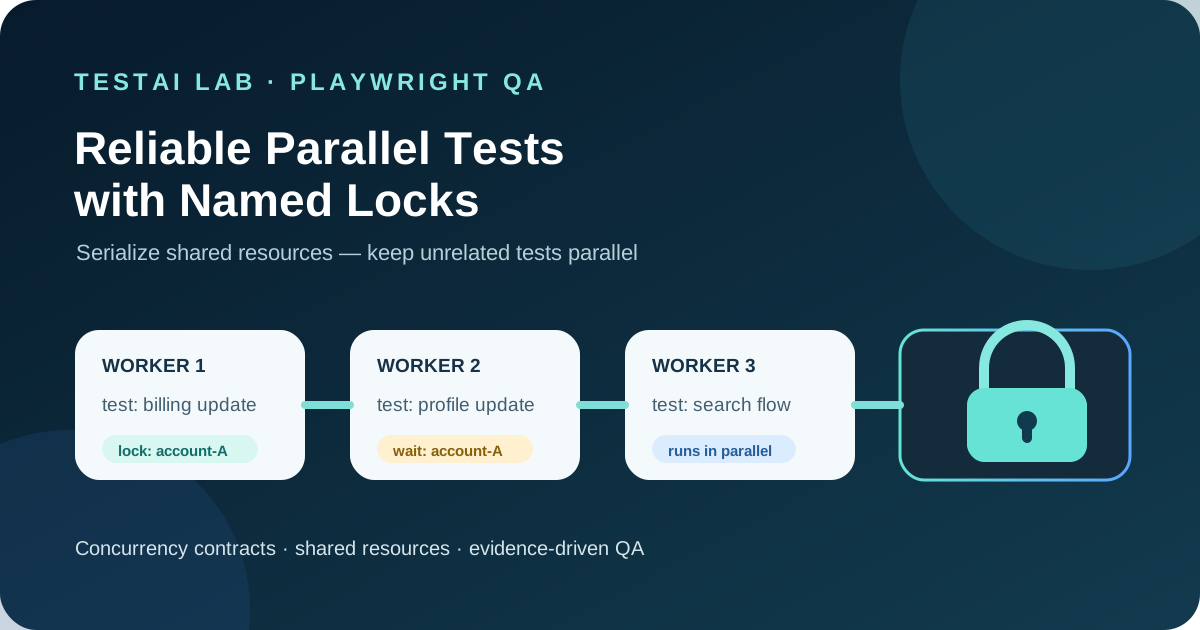
How to keep shared‑resource tests safe while still exploiting Playwright’s parallelism
1. Why “parallel” is not always “safe”
Playwright’s default test runner executes files in parallel workers and, inside each file, runs tests concurrently when fullyParallel is enabled. This gives dramatic speed‑ups on CI, but it also assumes that every test is isolated – i.e., it does not depend on a mutable external state that another test might touch at the same time.
Typical non‑isolated scenarios include:
| Shared resource | Typical conflict |
|---|---|
| A single test account on an external SaaS service | Simultaneous password changes, data wipes |
| A rate‑limited sandbox environment | Exceeding request quotas |
| Global configuration files written by tests | Overwrites that corrupt later runs |
| Test data that lives in a shared database | Concurrent inserts/updates causing flaky reads |
When such resources are accessed without coordination, tests become flaky, and CI pipelines lose their reliability. Historically the workaround was to mark the whole suite (or an entire file) as serial, which guarantees that no two tests run at the same time. The downside is that the whole suite loses parallelism, inflating execution time.
Playwright 1.63 introduces named test locks to address this gap. Locks let you declare a named resource that must be exclusive, while all other tests continue to run in parallel. The feature works across files, worker processes, and projects – exactly the boundaries where concurrency previously caused trouble.
> Official behavior – Playwright acquires all the locks of a test before the test starts and releases them when it finishes. In default and serial modes, a lock declared on any test is held for the duration of the whole file; with fully parallel execution, the lock is scoped to the individual test. (Playwright test locks documentation)
The rest of this article explains how to use locks correctly, how they interact with workers and projects, and how to design a pragmatic QA strategy that avoids deadlocks while preserving most of the parallel speed‑up.
2. Three baseline approaches
| Approach | Parallelism | Isolation guarantee | Typical use‑case |
|---|---|---|---|
| Isolated tests (no shared state) | Full parallel across workers, files, and projects | Each test runs independently; no coordination needed | Pure unit‑style UI tests |
Fully serial suite (test.describe.configure({ mode: 'serial' })) | No parallelism inside the file; files still run in parallel workers | Guarantees that any two tests in the file never overlap | Legacy suites that rely on a global browser or shared DB |
| Narrowly scoped locks (new in 1.63) | Parallelism is retained for all tests that do not share a lock name | Only tests that declare the same lock name are serialized; others run concurrently | Tests that need a single test account, a rate‑limited sandbox, or a global config file |
The lock approach is the sweet spot for most teams: you keep the fast default parallelism and only serialize the minimal set of tests that truly conflict.
3. Declaring locks – syntax and scope
3.1 At the test level
import { test, expect } from '@playwright/test';

test('create user in shared sandbox', { lock: 'sandbox-A' }, async ({ page }) => {
  // The lock name "sandbox‑A" is acquired before the test starts.
  // No other test that also asks for "sandbox‑A" will run concurrently.
  await page.goto('https://example.com/signup');
  // …
});
The lock name is declared in the test options object:
test('update shared account', { lock: 'shared-account' }, async ({ page }) => {
  // The test starts only when the named lock is available.
  // …
});
When fullyParallel is off (the default), the lock is held for the whole file because the test runner treats the file as a single unit. When fullyParallel is on, the lock is held only for the duration of the individual test.
3.2 At the test.describe level
If a whole group of tests needs the same exclusive resource, you can declare the lock once:
test.describe('Operations on shared sandbox A', () => {
  test.describe.configure({ lock: 'sandbox‑A' });

  test('reset sandbox', async ({ page }) => {
    // lock already acquired
    // …
  });

  test('run migration script', async ({ page }) => {
    // same lock, same exclusivity guarantee
    // …
  });
});
All tests inside the describe inherit the lock name, simplifying maintenance.
3.3 Multiple locks
A test can request more than one lock by passing an array:
test('reset the database', { lock: ['sandbox-A', 'shared-account'] }, async () => {
  // …
});
Playwright acquires all requested locks before the test starts and releases them when it finishes. The documentation does not define lock-acquisition order or fairness, so tests and QA policy must not depend on either.
4. Naming conventions – keeping the lock space manageable
Because lock names are global across the whole test run, a disciplined naming scheme prevents accidental collisions:
| Recommendation | Example |
|---|---|
| Prefix with the resource type | account‑admin, sandbox‑us‑east |
| Use kebab‑case (Playwright treats names as strings) | sandbox‑a |
| Keep names short but descriptive | rate‑limit‑api |
| Document the lock map in a shared README | (see migration plan) |
A clear map makes it easy for new contributors to understand which tests must not run together.
5. Interaction with workers, projects, and CI sharding
5.1 Workers
Playwright runs tests in configurable worker processes. Locks are enforced across workers: if Worker 1 holds lock sandbox‑A, Worker 2 waits before starting another test that requests sandbox‑A. This is the core guarantee that enables safe parallelism.
5.2 Projects
Projects are separate configurations (e.g., Chrome vs. Firefox). Locks are also global across projects. A test in the chromium project that locks shared‑account will block the same‑named test in the firefox project until the lock is released. This prevents two browsers from simultaneously mutating the same external account.
5.3 CI sharding
CI systems often split the test suite into shards that run on different agents. Playwright’s lock implementation is process‑local; it does not coordinate across separate CI machines. Therefore, a lock only guarantees exclusivity within a single CI job. If a shared resource truly cannot be accessed concurrently across agents, you must either:
- Allocate distinct resources per shard (e.g., separate test accounts), or
- Use a custom external lock service (outside the scope of Playwright’s built‑in feature).
The article does not claim distributed locking across CI machines because the official documentation does not guarantee it.
6. Practical concerns
6.1 Timeouts
Playwright does not expose a lock‑specific timeout. If a test cannot acquire its lock because another test is stuck, the waiting test will simply stay in the queue until the lock is released. In practice this can cause the overall suite to exceed the CI timeout. Mitigation strategies:
- Keep the critical section (the code that needs the lock) as short as possible.
- Add explicit
testInfo.setTimeout()to the test itself, so a hung lock will cause the test to fail rather than stall the whole run.
6.2 Failure recovery
Playwright releases a test’s locks when the test finishes, and Playwright shuts down a worker after a test failure. External state can nevertheless remain corrupted (for example, a partially updated account), so subsequent tests may still fail. Recommended practice:
- Use
test.afterEachortest.afterAllhooks to clean up the shared resource even when the test fails. - Consider a “reset” test that runs at the start of each CI job to bring the resource back to a known baseline.
6.3 Observability
The official documentation defines lock behavior but does not expose lock-acquisition telemetry. Treat timing evidence as team-owned instrumentation:
- record the test identifier and declared shared resource;
- record start and finish timestamps in CI logs or a custom reporter;
- compare tests with the same lock name against unrelated tests.
This evidence helps reveal unexpected contention without claiming undocumented runner internals.
6.4 Preventing deadlocks
Playwright waits until all requested locks are available before running a test. The following team policy is therefore about limiting contention and keeping lock usage reviewable:
- Rule 1 – Prefer no more than two locks per test unless a documented exception is reviewed.
- Rule 2 – Document locks that are commonly required together as one reviewed group.
- Rule 3 – Reuse canonical resource names; do not create aliases for the same shared resource.
These rules keep the lock registry small and easy to reason about.
7. Architecture & data‑flow view
Test files → named lock options → runner coordination → worker process → test result
- Inputs – Test files,
{ lock: … }options, Playwright configuration (fullyParallel,projects). - Outputs – Test results (pass/fail), optional lock‑acquire logs, and any side‑effects on the shared resource.
This diagram is a conceptual view of the documented contract: Playwright coordinates named locks across worker processes and projects before a test is allowed to start.
8. Test design checklist
| Category | What to verify |
|---|---|
| Positive | A test that declares lock sandbox‑A runs successfully when no other test holds that lock. |
| Negative | Two tests that both request sandbox‑A never overlap; the second test starts only after the first finishes. |
| Concurrency | Tests with different lock names (sandbox‑A vs sandbox‑B) run in parallel, even when executed on the same worker pool. |
| Timeout handling | A deliberately slow test uses an explicit test timeout; cleanup and external-state recovery are verified separately. |
| CI sharding | When the suite is split into two shards, each shard uses a distinct lock name (or external isolation) to avoid cross‑agent conflicts. |
Automated verification can be added to a “lock sanity” test suite that runs in a dedicated CI job.
9. Migration plan – from fully serial to lock‑based parallelism
- Identify shared resources – List external accounts, sandboxes, config files, databases that are mutated by tests.
- Add lock names – Add
{ lock: 'resource-name' }as the test options argument for each test that touches a shared resource. - Run a baseline – Execute the suite with
fullyParallel: trueand confirm that the lock‑sanity tests (section 8) pass. - Gradually expand – If a new test needs the same resource, add the same lock name.
- Measure – Compare total suite duration before and after lock adoption. Unrelated tests should still run in parallel; the reduction in wall‑clock time is the primary KPI.
- Human‑owned release gate – Before merging a PR that introduces a new lock, require a reviewer to verify that the lock name is documented and that no existing test already uses it unintentionally. This gate prevents accidental lock proliferation.
The migration can be performed incrementally; you do not need to switch the whole suite to serial mode.
10. Measurable evidence that unrelated tests stay parallel
Use explicit test start and finish timestamps from CI logs or a custom reporter to verify concurrency. After migration, evidence should show:
- Overlapping bars for tests without a shared lock.
- Gaps only where two tests with the same lock name are serialized.
From those timestamps, calculate an observed concurrency factor:
concurrency factor = (sum of individual test durations) / (suite wall-clock duration)A ratio close to the number of workers indicates that locks are not throttling the suite.
11. Where automation helps
| Area | Automation opportunity |
|---|---|
| Lock map validation | A lint rule that scans test files for lock: usage and flags duplicate or missing documentation. |
| Deadlock detection | A script that builds a lock‑dependency graph from the test suite and warns if any node has degree > 2 (per policy). |
| Performance regression | CI job that records suite duration and fails if the parallelism ratio drops below a threshold. |
| Resource health checks | Pre‑test hook that verifies the external sandbox is reachable; if not, the suite aborts early. |
| Release gate enforcement | Pull‑request check that ensures any new lock name is added to the shared lock‑registry file. |
These automated guards keep the lock strategy maintainable as the test base grows.
12. Recommended QA strategy (our take)
- Prefer isolation – Write tests that do not need any lock whenever possible.
- Introduce locks only for truly shared resources – Use the naming conventions and policy rules above.
- Keep critical sections tiny – Move all non‑essential work outside the locked region (e.g., page navigation can happen before acquiring the lock if it does not affect the shared state).
- Monitor lock contention – Review the recorded timing evidence or a custom lock log to ensure contention remains low.
- Document and review – Treat lock names as a shared contract; any change must go through the human‑owned release gate.
By following this approach you retain most of Playwright’s parallel speed while eliminating the flakiness caused by concurrent access to external resources.
13. Review questions
- What is the difference between a lock’s behavior in the default mode versus
fullyParallelmode? - How does Playwright enforce lock exclusivity across workers and projects?
- List two practical policies that reduce the risk of deadlocks when using multiple locks.
- Why must a team treat lock names as a shared contract and enforce a release‑gate review?
- Which part of the test suite should you still keep fully serial, if any, after adopting test locks?
14. Conclusion
Playwright 1.63’s named test locks give QA teams a precise tool to serialize only the tests that truly need exclusive access to an external resource. By understanding the scope of locks, naming them consistently, and applying a lightweight policy to avoid deadlocks, you can keep the majority of your suite running in parallel while eliminating flaky failures caused by shared‑state contention. Combine the built‑in lock mechanism with automated linting, performance monitoring, and a human‑owned release gate, and you’ll have a robust, scalable testing pipeline that respects both speed and reliability.
Leave a comment
Share your thoughts about the article. No account is required.
Comments
Loading comments…