How to replace the vague claim “100 % QA‑tested” with a concrete, auditable release‑gate pipeline.
Introduction
Every team that ships a web application wants confidence that the code reaching production works for real users. Marketing copy often reduces that confidence to a slogan such as “100 % QA‑tested”. The phrase is attractive, but it does not describe what was tested, how failures are detected, or what evidence is retained for later review.
A more defensible approach is to treat the CI/CD pipeline itself as a series of release gates. Each gate has a deterministic pass/fail criterion, produces immutable evidence, and is scoped to a specific risk surface. When a gate fails, the pipeline stops; when it passes, the next gate runs. The final gate is an explicit human decision that consumes the accumulated evidence.
Below is a practical design for a small web application (e.g., a product‑catalog site) that implements eight gates in GitHub Actions. The design draws on official documentation for Playwright, GitHub Actions, Lighthouse CI, and OWASP ZAP, and it shows how to keep flaky tests honest, preserve traces, and avoid letting an AI‑generated summary become the release decision.
The Problem with “100 % QA‑tested”
- Unverifiable scope – “100 %” says nothing about which user journeys, APIs, or non‑functional requirements were covered.
- No evidence – Without artefacts (screenshots, logs, reports) the claim cannot be inspected after the fact.
- All‑or‑nothing mindset – Teams may treat a single green check as a blanket approval, ignoring the nuance of advisory findings (e.g., a performance warning that does not block release).
Replacing the slogan with an evidence‑based gate model forces the team to answer three questions for every gate:
- What risk does the gate address?
- What deterministic condition determines pass/fail?
- What artefacts are stored for later audit?
The following sections walk through each gate, the signals it can prove, its limits, and the practical steps needed to enforce it.
Designing an Evidence‑Based Release Gate Pipeline
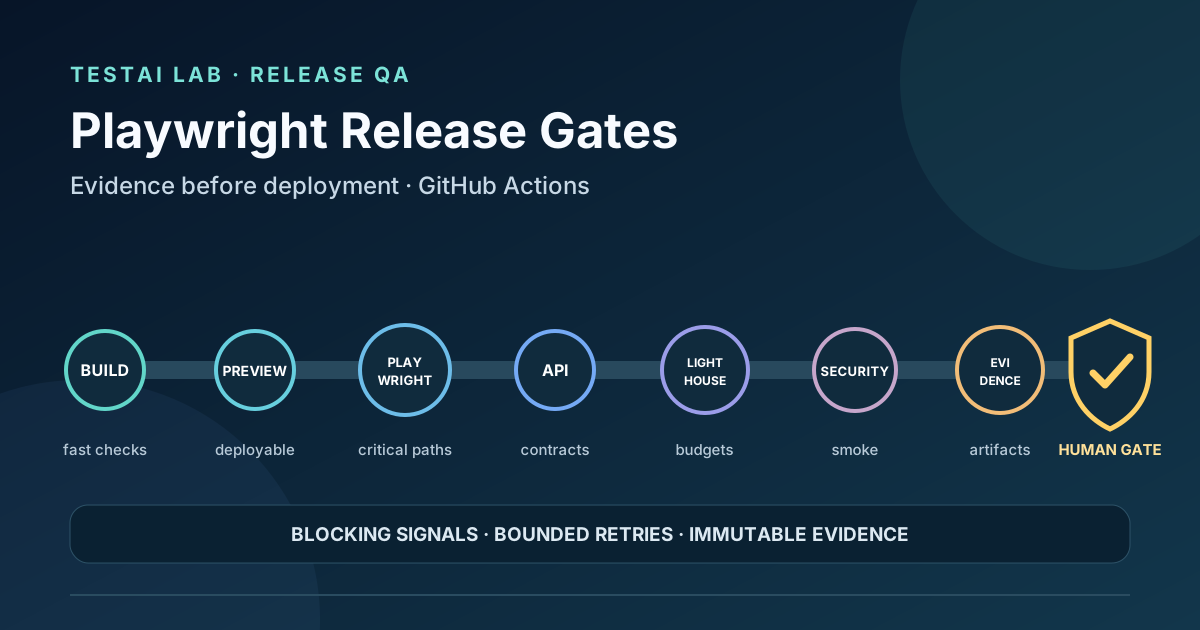
The pipeline is visualised as a linear chain, but GitHub Actions allows parallel execution where dependencies are expressed with needs. The eight gates are:
- Fail‑fast build & unit checks
- Preview deployment
- Playwright critical‑journey tests (desktop & mobile)
- API contract validation
- Accessibility & performance budgets (Lighthouse CI)
- Lightweight security smoke (OWASP ZAP)
- Immutable evidence artifacts
- Explicit human release approval
Each gate produces a blocking signal (must be green to continue) or an advisory signal (recorded but does not stop the pipeline). The distinction is encoded in the workflow by using continue-on-error: true for advisory jobs and by publishing their reports as artefacts.
Gate 1 – Fail‑Fast Build & Unit Checks
What it proves – The source compiles, linting passes, and unit tests exercise the core logic.
What it cannot prove – Integration behaviour, UI rendering, or performance under load.
Implementation
name: CI
on:
  push:
    branches: [main]
  pull_request:

jobs:
  build:
    runs-on: ubuntu-latest
    steps:
      - uses: actions/checkout@v4
      - name: Set up Node
        uses: actions/setup-node@v4
        with:
          node-version: '20'
      - name: Install dependencies
        run: npm ci
      - name: Lint
        run: npm run lint
      - name: Unit tests
        run: npm test -- --ci --reporter=dot
      - name: Upload unit report
        if: always()
        uses: actions/upload-artifact@v4
        with:
          name: unit-report
          path: coverage/
The job fails on any non‑zero exit code, guaranteeing a blocking outcome.
Retry policy – No retries are configured; a failing unit test is a hard stop. Flaky unit tests should be fixed before they reach CI.
Gate 2 – Preview Deployment
A short‑lived preview environment (e.g., using GitHub Pages, Vercel preview, or a Docker container on a self‑hosted runner) validates that the build artefacts can be served.
What it proves – The deployment script works, static assets are reachable, and environment variables are correctly injected.
What it cannot prove – Functional correctness of UI flows.
Implementation (simplified)
  preview:
    runs-on: ubuntu-latest
    needs: build
    outputs:
      preview_url: ${{ steps.deploy.outputs.preview_url }}
    steps:
      - uses: actions/checkout@v4
      - name: Deploy preview
        id: deploy
        run: |
          PREVIEW_URL="$(./scripts/deploy-preview.sh)"
          echo "preview_url=$PREVIEW_URL" >> "$GITHUB_OUTPUT"
      - name: Wait for health endpoint
        env:
          PREVIEW_URL: ${{ steps.deploy.outputs.preview_url }}
        run: |
          for i in {1..30}; do
            curl -sf "$PREVIEW_URL/health" && exit 0
            sleep 1
          done
          exit 1
The preview job must return a real, externally reachable URL as a job output. $GITHUB_ENV is job-scoped, and a background server on a GitHub-hosted runner does not survive into another job. Downstream jobs therefore read ${{ needs.preview.outputs.preview_url }}. If deployment or the bounded health check fails, the pipeline stops.
Gate 3 – Playwright Critical‑Journey Tests (Desktop & Mobile)
Playwright’s official CI guidance describes how to run browsers in headless mode inside GitHub Actions. Critical journeys (e.g., “search → product detail → add to cart”) are executed on both a desktop viewport and a mobile emulation.
What it proves – End‑to‑end functional flow works in the target browsers, selectors are stable, and key UI elements render.
What it cannot prove – Full cross‑browser coverage (only the browsers you run), performance under real network conditions, or security.
Blocking vs advisory – Functional Playwright failures are blocking. A failed expect.soft assertion lets the current test continue, but Playwright still marks the test as failed. If a visual comparison should be advisory, run it in a separate job or step with an explicit continue-on-error: true policy and preserve its report.
Playwright TypeScript example
import { test, expect } from '@playwright/test';

test.describe('Critical purchase journey', () => {
  // Run on both desktop and mobile
  test.use({
    viewport: { width: 1280, height: 720 },
    userAgent: 'desktop',
  });

  test('Desktop flow', async ({ page }) => {
    await page.goto(process.env.PREVIEW_URL!);
    await page.fill('#search', 'widget');
    await page.press('#search', 'Enter');
    await page.click('text=Widget Pro');
    await page.click('button#add-to-cart');

    // Soft assertion: continue collecting evidence, but the test still fails
    await expect(page.locator('#cart-count')).toHaveText('1', { timeout: 5000 });
    await expect.soft(page).toHaveScreenshot('cart-desktop.png');
  });

  test.use({
    viewport: { width: 375, height: 667 },
    deviceScaleFactor: 2,
    isMobile: true,
    userAgent: 'mobile',
  });

  test('Mobile flow', async ({ page }) => {
    await page.goto(process.env.PREVIEW_URL!);
    await page.tap('#search');
    await page.fill('#search', 'widget');
    await page.press('#search', 'Enter');
    await page.tap('text=Widget Pro');
    await page.tap('button#add-to-cart');

    await expect(page.locator('#cart-count')).toHaveText('1');
    await expect.soft(page).toHaveScreenshot('cart-mobile.png');
  });
});
Key points
process.env.PREVIEW_URLis injected from the preview job.expect.softcontinues the test after a failed assertion, but the test still finishes as failed; it is not an advisory release signal by itself.- Screenshots are automatically uploaded as artefacts (see the
upload-artifactstep in the workflow).
Flaky-test guard – Playwright retries are configured with retries in playwright.config.ts or with --retries. The default is zero. This example keeps retries: 0 so the first failure blocks the gate; if one evidence-gathering retry is allowed, configure it explicitly and report the test as flaky instead of hiding the first failure.
Gate 4 – API Contract Validation
Using a contract‑testing tool (e.g., OpenAPI validator) ensures that the backend responses conform to the published schema.
What it proves – The API contract is respected for the exercised endpoints.
What it cannot prove – Business‑logic correctness beyond the schema, or performance under load.
Implementation
  api-contract:
    runs-on: ubuntu-latest
    needs: preview
    steps:
      - uses: actions/checkout@v4
      - name: Install validator
        run: npm ci
      - name: Run contract tests
        env:
          BASE_URL: ${{ needs.preview.outputs.preview_url }}
        run: npm run contract:test
      - name: Upload contract report
        if: always()
        uses: actions/upload-artifact@v4
        with:
          name: contract-report
          path: contract-report/
The contract test script should exit with a non‑zero status on any schema violation, making the gate blocking.
Gate 5 – Accessibility & Performance Budgets (Lighthouse CI)
Lighthouse CI can be run against the preview URL to enforce budget thresholds for accessibility, performance, and best practices. The official Lighthouse CI documentation describes how to configure budgets in a lighthouserc.json file.
What it proves – The page meets defined quantitative thresholds (e.g., accessibility score ≥ 90, first‑contentful‑paint ≤ 1.5 s).
What it cannot prove – Subjective usability issues or real‑world network variability beyond the simulated conditions.
Implementation
  lighthouse:
    runs-on: ubuntu-latest
    needs: preview
    steps:
      - uses: actions/checkout@v4
      - name: Install Lighthouse CI
        run: npm ci && npm install -g @lhci/cli@0
      - name: Run LHCI
        env:
          LHCI_BUILD_CONTEXT__CURRENT_BRANCH: ${{ github.ref_name }}
          LHCI_BUILD_CONTEXT__GITHUB_PULL_REQUEST: ${{ github.event.pull_request.number }}
        run: |
          lhci collect --url=${{ needs.preview.outputs.preview_url }} --numberOfRuns=3
          lhci assert --config=./lighthouserc.json
      - name: Upload LHCI report
        if: always()
        uses: actions/upload-artifact@v4
        with:
          name: lighthouse-report
          path: .lhci/
The lhci assert step fails the job if any budget is violated, making the gate blocking. Advisory findings (e.g., a performance warning that is still above the budget) can be captured by omitting the assert step and only uploading the report.
Gate 6 – Lightweight Security Smoke (OWASP ZAP)
Running a quick scan with OWASP ZAP’s baseline scan provides early detection of common vulnerabilities (e.g., missing security headers).
What it proves – The deployed preview does not contain obvious security misconfigurations.
What it cannot prove – Comprehensive penetration testing or zero‑day exploits.
Implementation
  zap:
    runs-on: ubuntu-latest
    needs: preview
    steps:
      - uses: actions/checkout@v4
      - name: Baseline scan
        env:
          ZAP_TARGET: ${{ needs.preview.outputs.preview_url }}
        run: |
          docker run --rm -v "$PWD:/zap/wrk:rw" -t ghcr.io/zaproxy/zaproxy:stable \
            zap-baseline.py -t "$ZAP_TARGET" -c /zap/wrk/zap-rules.conf \
            -r zap-report.html -I
      - name: Upload ZAP report
        if: always()
        uses: actions/upload-artifact@v4
        with:
          name: zap-report
          path: zap-report.html
With -I, WARN findings do not fail the job. Rules marked FAIL in zap-rules.conf produce exit code 1 and block the gate; exit code 3 indicates another operational failure. This makes the policy explicit instead of treating every warning as a release blocker.
Gate 7 – Immutable Evidence Artifacts
All preceding gates upload their artefacts (unit coverage, Playwright screenshots, contract reports, Lighthouse JSON, ZAP HTML). The artefacts are stored in GitHub’s artifact storage, which is immutable for the duration of the workflow run.
Why it matters – Auditors, release managers, or future investigators can retrieve the exact evidence that justified the release decision. The artefacts also serve as a baseline for regression analysis.
  archive-evidence:
    runs-on: ubuntu-latest
    needs: [build, preview, playwright, api-contract, lighthouse, zap]
    if: always()
    steps:
      - name: Gather all artefacts
        run: echo "All artefacts already uploaded by individual jobs."
The archive-evidence job does not produce new artefacts but ensures the pipeline fails only after all evidence is safely stored.
Gate 8 – Explicit Human Release Approval
The final gate is a manual approval step that presents a summary of the collected evidence. The decision to promote the preview to production rests with a designated release manager or product owner.
Implementation
  approve:
    runs-on: ubuntu-latest
    needs: archive-evidence
    environment:
      name: production
      url: ${{ needs.preview.outputs.preview_url }}
    steps:
      - name: Request approval
        uses: peter-evans/repository-dispatch@v2
        with:
          token: ${{ secrets.GITHUB_TOKEN }}
          event-type: release-approval
          client-payload: |
            {
              "preview_url": "${{ needs.preview.outputs.preview_url }}",
              "artifacts": [
                "unit-report",
                "playwright-screenshots",
                "contract-report",
                "lighthouse-report",
                "zap-report"
              ]
            }
The environment protection rules in GitHub can be configured to require a reviewer. The reviewer inspects the artefacts via the GitHub UI, confirms that all blocking gates passed, and then clicks “Approve and Deploy”. The pipeline then proceeds to the production deployment job (not shown).
Managing Flaky Tests and Bounded Retries
- No implicit retries – GitHub Actions does not retry failed steps unless explicitly configured, and Playwright defaults to zero retries. Configure Playwright with
retriesor--retries; a matrix field namedretrydoes not change the Playwright runner. - Separate advisory findings –
expect.softallows more checks to run after a failure, but still marks the test failed. Advisory visual findings belong in an explicitly non-blocking job or step whose artifacts remain visible for triage. - Timeouts and retries at the test level – Playwright’s
test.setTimeoutand per‑step retries can be used sparingly; any retry count greater than one should be flagged for investigation.
Keeping Evidence Accessible
- Artifact naming – Use clear, versioned names (e.g.,
playwright-screenshots-${{ github.sha }}). - Retention policy – GitHub retains artifacts for 90 days by default; adjust the workflow’s
retention-daysif longer audit trails are required. - Linking from the approval UI – The manual approval step can display a markdown summary that links directly to each artifact, ensuring reviewers have one click to view the evidence.
Avoiding AI‑Generated Summaries as Release Decisions
Automation can generate a concise markdown summary of the run (e.g., using actions/github-script). While convenient, that summary should never replace the manual approval gate. To prevent an AI‑generated badge from becoming the de‑facto decision point:
- Require a protected environment with at least one human reviewer.
- Do not gate the production deployment on a status check that can be overridden by a bot.
- Store the AI summary as an artefact for reference only.
By keeping the human gate separate from any automated badge, the team preserves accountability and avoids the illusion of “full automation”.
Where Automation Helps
| Area | Automation Strength | Remaining Human Judgment |
|---|---|---|
| Build & Unit Tests | Fast, deterministic, repeatable. | Deciding test coverage adequacy. |
| Preview Deployment | Guarantees that the build artefacts can be served. | Evaluating environment‑specific config. |
| Playwright Critical Journeys | Detects regressions in core user flows across browsers. | Assessing UI/UX quality beyond functional correctness. |
| API Contract Checks | Enforces schema compliance automatically. | Determining whether contract changes are acceptable. |
| Lighthouse Budgets | Quantifies performance and accessibility thresholds. | Interpreting trade‑offs when a budget is marginally missed. |
| Security Smoke Scan | Catches obvious misconfigurations early. | Conducting deep security assessments. |
| Evidence Archival | Immutable storage of logs, screenshots, reports. | Auditing and post‑mortem analysis. |
| Human Approval | Provides a single, auditable decision point. | Weighing business impact, release timing, and risk tolerance. |
Automation excels at detecting deviations from defined expectations; humans excel at interpreting the significance of those deviations.
Review Questions
- What distinguishes a blocking gate from an advisory finding, and how is this expressed in a GitHub Actions workflow?
- Why does
expect.softstill produce a failed test, and how should an advisory visual check be separated from the blocking Playwright gate? - Which artefacts are uploaded after the Lighthouse CI job, and what budget condition causes the job to fail?
- How does the OWASP ZAP baseline scan contribute to the security gate, and what exit status indicates a blocking failure?
- What safeguards prevent an AI‑generated summary from becoming the sole release decision?
Conclusion
Replacing the marketing‑style claim “100 % QA‑tested” with an evidence‑based release‑gate pipeline forces every team to articulate what is being verified, how failures are handled, and where human judgment remains essential. By chaining fail‑fast builds, preview deployments, Playwright critical‑journey tests, API contract validation, Lighthouse budgets, a lightweight ZAP scan, immutable artefacts, and a final manual approval, the pipeline delivers concrete, auditable proof that the release meets its defined risk criteria. The approach is transparent, repeatable, and adaptable to any web application—providing confidence that is measurable, not merely advertised.
Sources
- Playwright CI documentation – https://playwright.dev/docs/ci
- GitHub Actions documentation – https://docs.github.com/en/actions
- Lighthouse CI documentation – https://github.com/GoogleChrome/lighthouse-ci
- OWASP ZAP documentation – https://www.zaproxy.org/docs/
Leave a comment
Share your thoughts about the article. No account is required.
Comments
Loading comments…