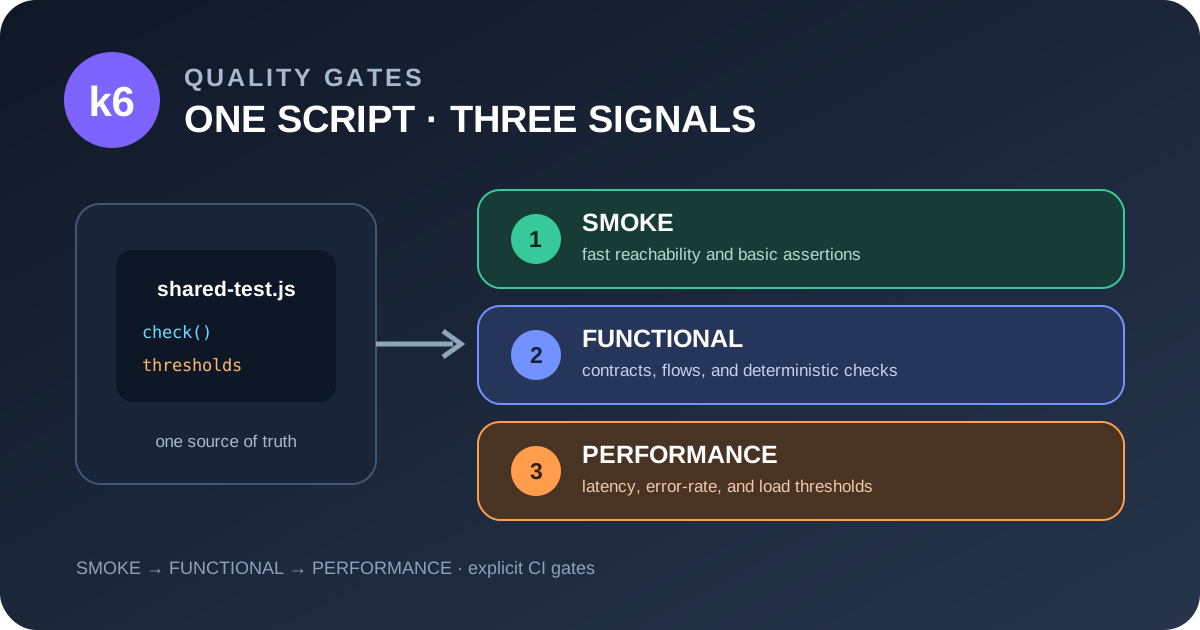
Practical guidance for QA engineers who want a single, maintainable k6 test asset to drive fast smoke checks, functional verification, and realistic performance validation in CI.
1. Why a single script can serve three gates
Continuous‑integration pipelines often contain three distinct quality gates:
| Gate | Goal | Typical CI constraints |
|---|---|---|
| Smoke | Verify that the service is up and that the most critical request returns a sane response. | Sub‑second execution, 1‑2 VUs, no load. |
| Functional | Exercise a business‑critical journey end‑to‑end and assert functional contracts. | Small, deterministic load (e.g., 5 VUs, a few iterations). |
| Performance | Model realistic traffic, capture latency percentiles, and enforce SLA thresholds. | Hundreds of VUs, ramp‑up stages, longer duration. |
Historically teams kept separate scripts for each gate, which leads to duplicated request definitions, divergent data handling, and drift in business logic.
k6 v2.3.0 introduced two CLI flags that make a single script viable for all three gates:
--scenario <name>– selects a named scenario at run time without editing the script.--once– runs the selected scenario once with a single virtual user while preserving all scenario‑level configuration (tags, environment variables, browser settings).
Because checks (assertions) and thresholds (pass/fail criteria) are defined inside the script, the same code can be exercised under different load profiles and still produce the appropriate CI exit code.
> Official note – Checks only record success/failure; they never cause a non‑zero exit code. Thresholds are the mechanism that makes a run fail in CI. (Grafana k6 v2.3.0 release notes)
The remainder of this guide shows how to structure a reusable script, how to invoke it for each gate, and what pitfalls to watch for.
2. Reusable script anatomy
Below is a minimal but complete example that demonstrates the recommended layout. The script lives in tests/k6/api-test.js.
import http from "k6/http";
import { check, sleep } from "k6";
import { Trend, Rate } from "k6/metrics";

/* ---------- 1. Global configuration ---------- */
export const options = {
  // Scenarios are defined once; the CLI picks which one to run.
  scenarios: {
    // 1️⃣ Smoke – single iteration, single VU
    smoke: {
      executor: "per-vu-iterations",
      exec: "journey",
      vus: 1,
      iterations: 1,
    },

    // 2️⃣ Functional – small deterministic load
    functional: {
      executor: "per-vu-iterations",
      exec: "journey",
      vus: 5,
      iterations: 3,
    },

    // 3️⃣ Performance – realistic ramp‑up
    performance: {
      executor: "ramping-vus",
      exec: "journey",
      startVUs: 10,
      stages: [
        { duration: "30s", target: 50 },
        { duration: "2m", target: 200 },
        { duration: "30s", target: 0 },
      ],
    },
  },

  // Global thresholds that apply to *all* scenarios unless overridden later.
  thresholds: {
    // Every business check must pass for smoke and functional CI gates.
    checks: ["rate==1"],

    // Basic health – any HTTP error fails the pipeline.
    http_req_failed: ["rate<0.01"],

    // Latency SLA – only enforced for the performance scenario.
    "http_req_duration{scenario:performance}": ["p(95)<800"],
  },

  // Tags help you filter results later (e.g., in Grafana dashboards).
  tags: {
    component: "orders-api",
    team: "payments",
  },
};

/* ---------- 2. Environment‑aware data ---------- */
// Base URL can be overridden per environment (CI, local, staging, prod).
const BASE_URL = __ENV.BASE_URL || "https://api.dev.example.com";

// A tiny data‑fixture that is safe to reuse across VUs.
const testUser = {
  id: __ENV.TEST_USER_ID || "user‑123",
  token: __ENV.TEST_USER_TOKEN || "dummy-token",
};

/* ---------- 3. Custom metrics (optional) ---------- */
const latencyTrend = new Trend("order_latency");
const errorRate = new Rate("order_error");

/* ---------- 4. The reusable journey ---------- */
export function journey() {
  // 1️⃣ Authenticate (example – token already supplied)
  const authHeaders = {
    headers: { Authorization: `Bearer ${testUser.token}` },
  };

  // 2️⃣ Create an order (deterministic payload)
  const payload = JSON.stringify({
    userId: testUser.id,
    items: [{ sku: "SKU‑001", qty: 1 }],
    // This traceable marker avoids collisions; safe cleanup is still required.
    testRunId: `${__VU}-${__ITER}-${Date.now()}`,
  });

  const res = http.post(`${BASE_URL}/orders`, payload, authHeaders);
  const ok = check(res, {
    "status is 201": (r) => r.status === 201,
    "order id returned": (r) => !!r.json("orderId"),
  });

  // Record custom metrics.
  latencyTrend.add(res.timings.duration);
  errorRate.add(!ok);

  // Simulate think‑time – important for realistic performance runs.
  sleep(0.5);
}

/* ---------- 5. Scenario‑specific thresholds (optional) ---------- */
// The `options` object can be mutated at runtime, but keeping them static
// makes the script easier to audit. If you need a tighter SLA for a
// functional gate, you can add a conditional block like:
//
// if (__ENV.GATE === "functional") {
//   options.thresholds["http_req_duration{scenario:functional}"] = ["p(95)<500"];
// }
Key take‑aways from the script
| Aspect | How it supports the three gates |
|---|---|
Named journeys (journey) | One function is referenced by every scenario via exec. |
| Environment‑aware data | __ENV variables let CI inject the correct base URL and safe test credentials without hard‑coding. |
| Deterministic checks | check statements assert business rules; they are recorded for every run but never abort the CI job. |
| Scenario‑specific load profiles | scenarios object defines three independent workloads; the CLI flag --scenario picks which one to execute. |
| Tags | Global tags (component, team) and scenario‑specific tags (scenario:performance) enable fine‑grained reporting. |
| Thresholds | Global health thresholds (http_req_failed) apply to all gates; latency SLA is scoped to the performance scenario only. |
3. Running the script in CI
3.1 Command line cheat‑sheet
| Gate | Command | What it does |
|---|---|---|
| Smoke | k6 run --once --scenario smoke tests/k6/api-test.js | Executes the journey once with a single VU; fast feedback, no load. |
| Functional | k6 run --scenario functional tests/k6/api-test.js | Runs 5 VUs, 3 iterations each – enough to surface race conditions while staying deterministic. |
| Performance | k6 run --scenario performance tests/k6/api-test.js | Executes the ramp‑up profile defined in the performance scenario; thresholds on p95 latency will cause a non‑zero exit code if breached. |
All three commands can be placed in separate CI jobs or stages. The same script file is version‑controlled, so any change to request bodies, headers, or authentication is automatically reflected across gates.
3.2 Example CI matrix (GitHub Actions)
name: API Quality Gates
on:
  push:
    branches: [main]

jobs:
  smoke:
    runs-on: ubuntu-latest
    steps:
      - uses: actions/checkout@v4
      - name: Install k6
        uses: grafana/setup-k6-action@v1
      - name: Smoke test
        env:
          BASE_URL: ${{ secrets.STAGING_URL }}
          TEST_USER_ID: ${{ secrets.TEST_USER_ID }}
          TEST_USER_TOKEN: ${{ secrets.TEST_USER_TOKEN }}
        run: k6 run --once --scenario smoke tests/k6/api-test.js

  functional:
    needs: smoke
    runs-on: ubuntu-latest
    steps:
      - uses: actions/checkout@v4
      - name: Install k6
        uses: grafana/setup-k6-action@v1
      - name: Functional test
        env:
          BASE_URL: ${{ secrets.STAGING_URL }}
          TEST_USER_ID: ${{ secrets.TEST_USER_ID }}
          TEST_USER_TOKEN: ${{ secrets.TEST_USER_TOKEN }}
        run: k6 run --scenario functional tests/k6/api-test.js

  performance:
    needs: functional
    runs-on: ubuntu-latest
    steps:
      - uses: actions/checkout@v4
      - name: Install k6
        uses: grafana/setup-k6-action@v1
      - name: Performance test
        env:
          BASE_URL: ${{ secrets.PERFORMANCE_ENV_URL }}
          TEST_USER_ID: ${{ secrets.PERF_USER_ID }}
          TEST_USER_TOKEN: ${{ secrets.PERF_USER_TOKEN }}
        run: k6 run --scenario performance tests/k6/api-test.js
Notice: The same script path (tests/k6/api-test.js) appears in every job. Only the environment variables and the --scenario flag differ.
4. Risks & mitigation strategies
| Risk | Description | Mitigation |
|---|---|---|
| Destructive test data | Load tests may create orders, users, or other entities that pollute a shared environment. | Use a dedicated non-production load-test tenant, generate traceable run identifiers, and verify cleanup after the run. |
| Hidden state between scenarios | Because --once still runs the full scenario function, any global mutable state (e.g., module‑level variables) can leak from a previous run. | Keep all mutable data inside the journey function or explicitly reset globals at the top of the script. |
| Threshold drift | Over time teams may relax thresholds to keep CI green, eroding the SLA guarantee. | Store thresholds in code review (as shown) and enforce a “threshold audit” checklist before each release. |
| Partial‑scenario threshold behavior | A threshold scoped to a specific scenario ({scenario:performance}) will be ignored when the smoke scenario runs, potentially hiding a regression. | Define baseline health thresholds (e.g., http_req_failed) that apply to every scenario; add scenario‑specific SLAs only where they make sense. |
| Over‑reliance on automation | Checks confirm response shape but do not replace exploratory testing of edge cases. | Pair the CI gates with a manual “exploratory sprint” that runs the same journeys with ad‑hoc data and UI inspection. |
When any of the above risks become hard to control, consider splitting the script:
- Separate smoke script – tiny, read‑only request that never mutates state.
- Dedicated performance script – contains heavy data‑setup steps and custom metrics.
Splitting adds maintenance overhead but isolates destructive actions and makes the CI intent clearer.
5. Review checklist before merging a k6 script
- Scenario definitions – each gate has a distinct scenario with appropriate executor and VU count.
- Environment variables – no hard‑coded URLs or credentials; all secrets injected via
__ENV. - Controlled test data – uses a traceable run identifier, a dedicated non-production tenant and verified cleanup.
- Checks vs thresholds – every business assertion lives in
check; every CI‑gate pass/fail rule lives inthresholds. - Tagging – global tags are present; scenario‑specific tags are used for filtering dashboards.
- Idempotency – the API endpoint under test can safely be called repeatedly without side effects that affect later runs.
- Documentation – the script header lists the purpose of each scenario and the SLA numbers it enforces.
If any item fails, pause the merge and address the gap.
6. Human‑owned release decision
Even with automated gates, a human must decide whether to promote a build:
| Decision point | What the tester looks for |
|---|---|
| Smoke green | Service reachable, basic contract satisfied. |
| Functional green | All functional checks pass across multiple VUs; no flaky errors observed. |
| Performance thresholds | p95 latency under SLA, error rate below 1 %. |
| Observability | Grafana dashboards show no unexpected spikes; logs contain no hidden 5xx errors. |
| Risk assessment | No destructive data left behind; cleanup succeeded; test environment mirrors production. |
| Stakeholder sign‑off | Product owner confirms that the tested journey is the current business priority. |
Only after the team collectively confirms the above does the release move forward. Automation supplies the data; judgment supplies the context.
7. Where automation helps
Automation is not a silver bullet, but it excels at:
- Regression safety net – Re‑running the same journey on every commit catches accidental contract breaks instantly.
- Load‑profile repeatability – Scenarios guarantee that the same ramp‑up pattern is applied across runs, making performance trends trustworthy.
- Metric collection – Custom trends (
order_latency) and rates (order_error) are gathered without manual effort, enabling data‑driven decisions. - CI integration – Threshold failures automatically block merges, reducing the chance of a broken release reaching production.
These benefits complement, rather than replace, exploratory testing, usability reviews, and security assessments.
8. Conclusion
k6 v2.3.0’s --once and --scenario flags give QA teams a pragmatic path to one script, three quality gates. By separating checks (functional assertions) from thresholds (CI‑gate pass/fail), and by defining clear scenario profiles, you gain:
- Maintainability – a single source of truth for request definitions and data handling.
- Speed – smoke and functional gates run in seconds, keeping developer feedback tight.
- Confidence – performance runs enforce SLA thresholds, preventing regressions from slipping into production.
The approach still requires disciplined test design, vigilant risk mitigation, and a final human release decision. When combined with thoughtful exploratory testing—especially for AI‑driven features—this pattern delivers a balanced, scalable quality‑gate strategy for modern software delivery pipelines.
Sources
- Grafana k6 v2.3.0 release notes
https://github.com/grafana/k6/releases/tag/v2.3.0
- Grafana k6 documentation: Scenarios
https://grafana.com/docs/k6/latest/using-k6/scenarios/
- Grafana k6 documentation: Thresholds
https://grafana.com/docs/k6/latest/using-k6/thresholds/
- Grafana k6 documentation: Options reference
https://grafana.com/docs/k6/latest/using-k6/k6-options/reference/
Leave a comment
Share your thoughts about the article. No account is required.
Comments
Loading comments…