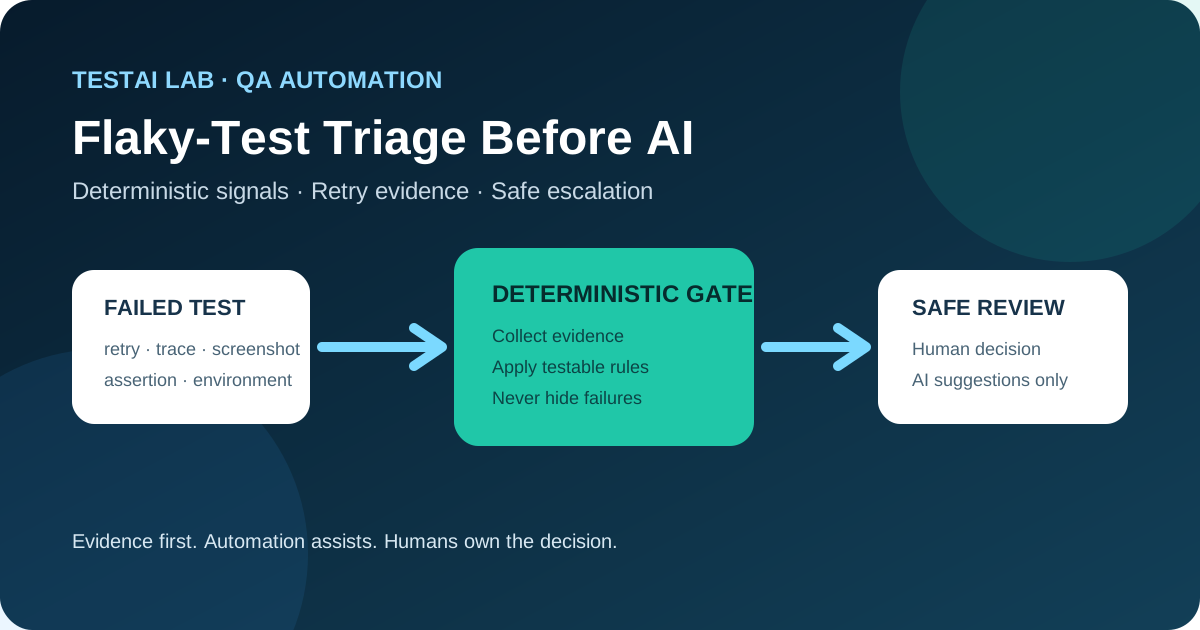
How to turn raw Playwright CI data into a reliable first‑pass classification before involving an AI assistant.
1. Why a deterministic triage layer matters
Flaky tests waste developer time, hide real regressions, and erode confidence in the CI pipeline. The temptation is to hand every ambiguous failure over to an AI model that suggests locator changes or automatically disables the test. While AI can be a useful assistant, it must never replace a disciplined evidence‑gathering step. A deterministic triage layer guarantees that the decision to involve a human—or an AI—rests on concrete, reproducible signals rather than on speculation.
Playwright’s built‑in retry support, trace viewer, screenshots, and artifact publishing (as described in the official documentation) give us exactly the data needed for that first pass. By extracting the retry count, the outcome of each attempt, the type of assertion that failed, and the environment metadata, we can separate high‑confidence infrastructure or product failures from cases that remain ambiguous.
2. A concrete CI scenario
Consider a GitHub Actions workflow that runs Playwright tests on a matrix of browsers. The workflow publishes the following artifacts for every run:
- Trace files (
.zip) – contain step‑by‑step network, DOM, and screenshot data. - Screenshots – captured on failure.
- Video – optional, but useful for visual verification.
- Test metadata – exposed through
testInfo(retry number, worker index, project name, etc.).
When a test fails, the workflow automatically uploads these artifacts as part of the run summary, making them instantly available for downstream analysis.
3. Step‑by‑step deterministic triage
| Step | What we capture | Why it matters |
|---|---|---|
| 1. Detect failure | Playwright marks the test as failed in the JSON report. | Entry point for triage logic. |
| 2. Record attempt number | testInfo.retry (0 for first attempt, 1 for first retry, …). | Determines whether the failure is a first‑attempt problem or a retry‑only anomaly. |
| 3. Capture retry outcome | Success or failure of the subsequent attempt(s). | A retry that passes does not guarantee the original failure was harmless; it only shows that the test can succeed under slightly different timing or resource conditions. |
| 4. Classify assertion | Identify the exception type (AssertionError, TimeoutError, network‑related error, etc.). | Certain categories (e.g., network timeouts) are more likely to be infrastructure‑related, while others (e.g., mismatched UI text) may indicate a product change. |
| 5. Attach trace & screenshot | Use testInfo.attachments to store the trace file and the failure screenshot. | Provides deterministic visual evidence that can be inspected without rerunning the test. |
| 6. Record environment metadata | OS, browser version, CI runner ID, commit SHA, and any feature flags. | Helps spot patterns such as “fails only on Windows Chrome 115”. |
| 7. Apply deterministic rules | A small, unit‑testable function evaluates the collected data and returns one of three labels: Infrastructure, Product, Ambiguous. | The rule set is transparent, version‑controlled, and can be reviewed by the team. |
| 8. Route the result | Infrastructure → auto‑create a ticket for the infra team. <br>Product → auto‑create a defect ticket with the trace attached. <br>Ambiguous → flag for human review or optional AI assistance. | Guarantees that only high‑confidence cases are acted upon automatically. |
The flow stops at step 7 for Infrastructure and Product classifications. Only when the rule set cannot reach a confident decision do we involve a human or an AI assistant.
4. TypeScript example – attaching deterministic evidence
import { test, expect, TestInfo } from '@playwright/test';

// Helper that builds a structured evidence object
function buildEvidence(info: TestInfo, error: Error) {
  const evidence = {
    retry: info.retry,                     // attempt number
    outcome: info.status,                  // "failed" or "passed"
    assertion: error.name,                 // e.g., "AssertionError"
    message: error.message,
    tracePath: info.attachments.find(a => a.name === 'trace')?.path,
    screenshotPath: info.attachments.find(a => a.name === 'screenshot')?.path,
    env: {
      os: process.platform,
      browser: info.project.name,
      commit: process.env.GITHUB_SHA,
      runId: process.env.GITHUB_RUN_ID,
    },
  };
  // Persist as JSON artifact for later rule evaluation
  info.attach('triage-evidence', {
    body: JSON.stringify(evidence, null, 2),
    contentType: 'application/json',
  });
}

// Example test that records evidence on failure
test('checkout flow shows correct total', async ({ page }, testInfo) => {
  try {
    await page.goto('https://example.com/checkout');
    await expect(page.locator('#total')).toHaveText('$42.00');
  } catch (err) {
    // Capture trace and screenshot before rethrowing
    await testInfo.attach('trace', { path: testInfo.outputPath('trace.zip'), contentType: 'application/zip' });
    await testInfo.attach('screenshot', { path: testInfo.outputPath('failure.png'), contentType: 'image/png' });
    buildEvidence(testInfo, err as Error);
    throw err; // Let Playwright mark the test as failed
  }
});
Key points
testInfo.retryis the deterministic signal that tells us whether the failure happened on the first attempt.- The
triage-evidenceattachment is a JSON file that downstream scripts can parse without re‑executing the test. - All artifacts are uploaded automatically by GitHub Actions when the job finishes, making them available for the rule engine.
5. Deterministic classification rules (unit‑testable)
type Evidence = {
  retry: number;
  outcome: 'failed' | 'passed';
  assertion: string;
  env: { os: string; browser: string };
};

export function classify(e: Evidence): 'Infrastructure' | 'Product' | 'Ambiguous' {
  // Rule 1 – Infrastructure timeout on first attempt
  if (e.retry === 0 && e.assertion === 'TimeoutError') {
    return 'Infrastructure';
  }

  // Rule 2 – Assertion error that passes on retry → ambiguous
  if (e.retry > 0 && e.assertion === 'AssertionError' && e.outcome === 'passed') {
    return 'Ambiguous';
  }

  // Rule 3 – Consistent assertion error across all attempts → product defect
  if (e.retry === 0 && e.assertion === 'AssertionError') {
    return 'Product';
  }

  // Rule 4 – Known flaky pattern (e.g., Chrome on Linux) – treat as infrastructure
  if (e.env.browser.includes('chrome') && e.env.os === 'linux' && e.assertion === 'NetworkError') {
    return 'Infrastructure';
  }

  // Default – we cannot decide with confidence
  return 'Ambiguous';
}
Each rule is deliberately simple, making it easy to write unit tests that verify the expected label for a given evidence payload. The rule set can evolve as the team discovers new patterns, but any change must be reviewed and version‑controlled.
6. Why a “retry‑passed” result is not proof of harmless flakiness
Playwright’s retry mechanism reruns the whole test (or the failing step, depending on configuration). A passed retry shows that the test can succeed under a slightly different timing or resource snapshot, but it does not explain why the first attempt failed. Common hidden causes include:
- Transient network latency that exceeds the default timeout on the first attempt but not on the retry.
- Race conditions in the application that manifest only when the DOM is in a particular state.
- Resource contention on the CI runner (e.g., CPU throttling) that disappears after a short pause.
If we automatically label such cases as “harmless”, we risk missing a regression that only appears under a specific load pattern. The deterministic evidence (trace, screenshot, retry count) lets a human verify whether the retry success is truly benign or whether it masks a deeper issue.
7. Why an AssertionError is not automatically a product defect
An AssertionError simply tells us that an expectation in the test did not match the observed value. The mismatch can stem from:
- Locator drift – the selector points to a different element after a UI redesign.
- Timing variance – the element’s text updates a few milliseconds later than the assertion runs.
- Environmental differences – fonts, locale, or DPI settings that affect rendered text.
Only when the evidence shows a consistent mismatch across all attempts and environments should we treat it as a product defect. Otherwise, the failure belongs to the infrastructure or flaky‑test bucket, and the appropriate response is a retry‑policy adjustment or a test‑stability improvement, not a defect ticket.
8. Safe escalation to AI – what an assistant may (and may not) do
When the deterministic classifier returns Ambiguous, a team may choose to involve an AI assistant for suggestions. The scope of that assistance must be tightly bounded:
| Allowed AI actions | Prohibited AI actions |
|---|---|
| Propose a new locator based on the trace screenshot. | Directly modify the test file without human approval. |
| Summarize the trace steps that led to the failure. | Suppress the flaky test or mark it as “skip”. |
| Highlight missing network requests that could explain a timeout. | Generate a defect description that is automatically filed without review. |
The rationale is simple: an AI model does not have the contextual knowledge of product intent, release schedule, or risk tolerance. It can surface clues, but the final decision—whether to change a selector, adjust a timeout, or open a defect—must remain a human judgment.
9. Where automation helps
- Evidence collection – Playwright’s built‑in
testInfoand trace viewer automate the capture of deterministic data, removing manual screenshot hunting. - Rule‑engine execution – The classification function can run as a GitHub Action step that tags the run with a label (
infra,product,needs‑review). This eliminates the need for a person to read every failure log. - Artifact publishing – GitHub Actions automatically stores traces and screenshots as downloadable artifacts, ensuring that the data is immutable and auditable.
- Notification routing – Based on the label, a workflow can post to the appropriate Slack channel or create a Jira ticket, guaranteeing that the right team receives the right signal.
Automation stops short of decision‑making; it supplies the facts that enable a quick, reliable human or AI‑assisted review.
10. Review questions
- Which Playwright property tells you the current retry attempt, and why is it essential for deterministic triage?
- Explain why a test that passes on a retry should still be examined before being declared “flaky but harmless”.
- List two assertion categories that are more likely to indicate infrastructure problems rather than product defects.
- What are the three possible classification outcomes of the deterministic rule engine, and what action does each trigger?
- Identify one AI‑suggested action that is permissible in the “Ambiguous” bucket and one that must be prohibited.
11. Conclusion
Flaky tests are inevitable, but the way we handle them determines whether they become a productivity drain or a manageable signal. By leveraging Playwright’s retry metadata, trace artifacts, and structured attachments, we can build a deterministic triage layer that reliably separates high‑confidence infrastructure or product failures from truly ambiguous cases. Only the latter should be escalated to a human reviewer or an AI assistant, and even then the AI’s role must be limited to suggestion, not execution. This disciplined approach preserves test integrity, keeps the CI pipeline trustworthy, and ensures that automation remains a helper rather than an unchecked decision‑maker.
Sources
- Playwright Test retries – https://playwright.dev/docs/test-retries
- Playwright Trace Viewer – https://playwright.dev/docs/trace-viewer
- GitHub Actions documentation on artifact upload – https://docs.github.com/en/actions/using-workflows/storing-workflow-data-as-artifacts
Leave a comment
Share your thoughts about the article. No account is required.
Comments
Loading comments…