A browser test opens a page and receives HTML instead of the expected application state. The status is 200, the screenshot shows a verification screen, and the test reports a missing element. Is this a product regression, a broken test, environment drift, or an edge-security decision?
For QA teams, the useful response is not to make the automation “look human.” It is to classify the failure, preserve evidence, and work with the application and security owners. This guide is for authorized testing of systems your team owns or has explicit permission to test. It does not describe bypassing CAPTCHAs, challenges, rate limits, Web Application Firewall rules, fingerprinting, or other access controls.
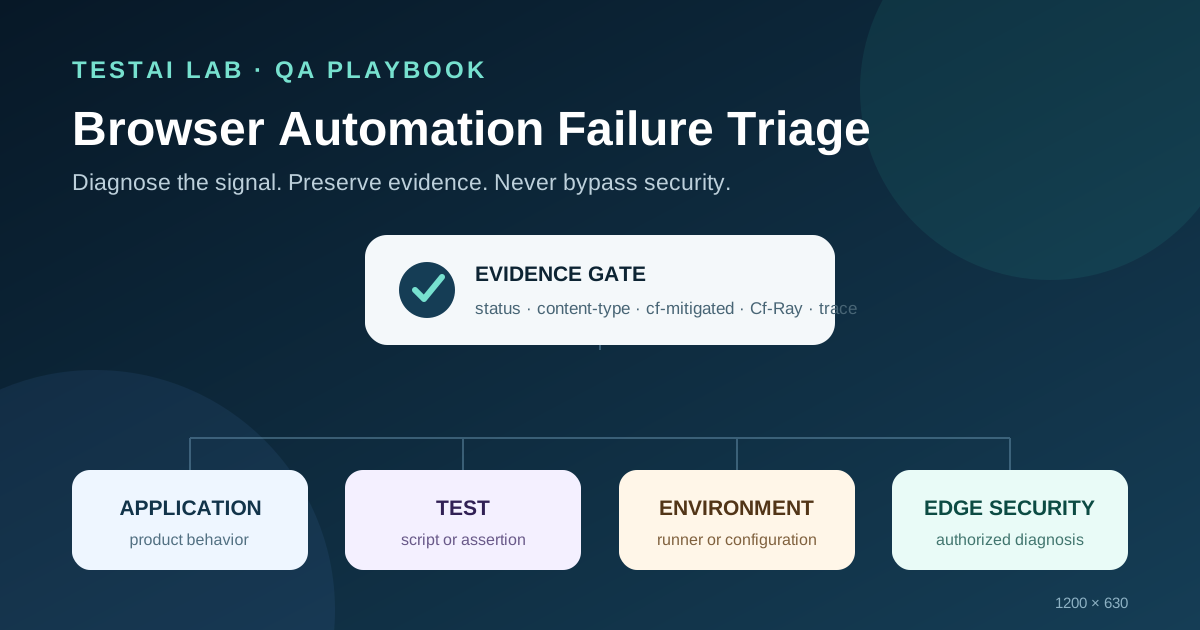
Start with four possible causes
Use four buckets before deciding what to fix.
- Application regression. The requested application content was delivered, but its behavior or contract changed. Examples include a missing component, an incorrect API field, or a server-side error from the application.
- Test defect. The script uses a stale selector, invalid test data, the wrong route, or an incorrect expectation. A passing manual check in the same controlled environment may help reveal this difference.
- Environment drift. The runner targets the wrong host, uses an outdated browser image, lacks a certificate, or differs from the approved CI configuration.
- Edge-security mitigation. A reverse proxy or bot-management layer returns a challenge instead of the application response.
A status code alone cannot choose the bucket. Cloudflare documents that Challenge Pages may return HTML with a 200 status. For Cloudflare-managed challenges, the reliable response signal is the header cf-mitigated: challenge; the content type is text/html.
Capture evidence before retrying
An immediate retry may replace the original evidence and make diagnosis harder. Record a small, sanitized evidence package first:
- UTC timestamp, HTTP method, hostname and path;
- status code and response content type;
cf-mitigatedandCf-Rayresponse headers, when present;- page title, screenshot, and a short non-sensitive DOM description;
- browser console errors;
- a redacted network trace or HAR;
- a Playwright trace when Playwright is used;
- runner identity, browser version, test revision, and environment configuration version.
Treat HAR files and traces as sensitive artifacts. Cloudflare’s troubleshooting guidance warns that HAR data may contain cookies, authorization headers, query parameters, and other private information. Redact before sharing, restrict access, and apply a retention period.
The Cf-Ray value is useful for correlating a browser failure with Cloudflare logs, but it does not by itself prove that a challenge occurred. Use it as a correlation identifier, not as the classification rule.
A safe Playwright evidence helper
The helper below detects the documented Cloudflare signal and returns a small evidence object. It does not change headers, solve a challenge, or conceal automation.
import type { Response } from '@playwright/test';

export function inspectResponse(response: Response) {
  const headers = response.headers();
  const mitigation = headers['cf-mitigated'] ?? null;
  const contentType = headers['content-type'] ?? '';
  const rayId = headers['cf-ray'] ?? null;

  return {
    status: response.status(),
    contentType,
    mitigation,
    rayId,
    isCloudflareChallenge:
      mitigation === 'challenge' && contentType.includes('text/html'),
  };
}
A test can attach this object to its report and stop with a clear diagnostic:
const response = await page.goto(targetUrl);
if (!response) throw new Error('Navigation produced no HTTP response');

const evidence = inspectResponse(response);
test.info().attach('edge-evidence.json', {
  body: JSON.stringify(evidence, null, 2),
  contentType: 'application/json',
});

expect(
  evidence.isCloudflareChallenge,
  'The edge layer returned a Cloudflare Challenge Page'
).toBe(false);
This helper does not decide whether every non-challenge failure is an application, test, or environment problem. That requires context: the expected contract, approved environment configuration, application logs, and comparison with a known-good run.
A practical triage sequence
Follow the same order for each failure.
- Confirm the target. Check the hostname, route, environment, test revision, runner image, and browser version.
- Inspect the response. Record status, content type,
cf-mitigated, andCf-Ray. - Check the delivered content. Determine whether it is the application, a proxy error, or a challenge page.
- Compare with a known-good run. Use the same authorized environment and configuration. Do not repeatedly probe production.
- Correlate server and edge logs. The application owner can use the timestamp and Ray ID to find the matching event.
- Assign the bucket. Route the issue to product, test automation, platform, or security ownership.
- Fix and rerun once. Preserve both the failed and successful evidence packages.
Playwright Trace Viewer helps connect actions, DOM snapshots, console messages, and network activity. Playwright’s network tooling can observe requests and responses without turning the test into a security-evasion mechanism.
Design an automation-friendly test environment
Selenium’s official test-practice guidance discourages automating CAPTCHAs. The sustainable solution is an owner-controlled test path, not a CAPTCHA-solving script.
For a dedicated staging environment, the site owner may use a narrowly scoped Cloudflare Skip rule or another approved allowlist. Cloudflare places Skip rules before Block or Challenge rules, so rule order matters. Apply these controls carefully:
- limit the rule to the staging hostname and authorized runner identity;
- use least privilege and an expiry date;
- avoid reusable secrets in URLs;
- log rule changes and review matches;
- keep production bot-defense validation separate;
- remove the exception when it is no longer needed.
A staging exception proves that the application can be tested under the approved test policy. It does not prove that production bot protection is effective. Security validation needs its own scope, authorization, success criteria, and evidence.
Negative tests without bypassing controls
Useful negative checks can be performed in an owner-controlled environment:
- return a fixture response with
cf-mitigated: challengeand verify that the helper classifies it as an edge challenge; - return normal HTML without the header and verify that it is not falsely classified;
- return JSON errors and verify that the test records them for application or contract analysis;
- remove required environment configuration and verify that the run fails with an environment-specific diagnostic;
- confirm that evidence attachments contain no cookies, tokens, request bodies, or personal data.
Mocks validate classification logic. They do not validate the real production edge configuration.
Reviewer checklist
Before merging a protected-browser test, ask:
- Does the test distinguish application, test, environment, and edge-security failures?
- Does it use the documented
cf-mitigated: challengesignal instead of guessing from page text? - Are traces and HAR files redacted and access-controlled?
- Is every exception owner-controlled, narrow, temporary, and auditable?
- Does the test avoid challenge solving, fingerprint manipulation, header spoofing, and repeated probing?
- Can an engineer reproduce the classification from the saved evidence?
Conclusion
Bot protection should not turn every browser failure into a vague “element not found” defect. A reliable QA process preserves evidence, recognizes documented edge signals, separates four root-cause categories, and routes the issue to the right owner. The goal is observability and safe diagnosis—not bypassing security.
Leave a comment
Share your thoughts about the article. No account is required.
Comments
Loading comments…