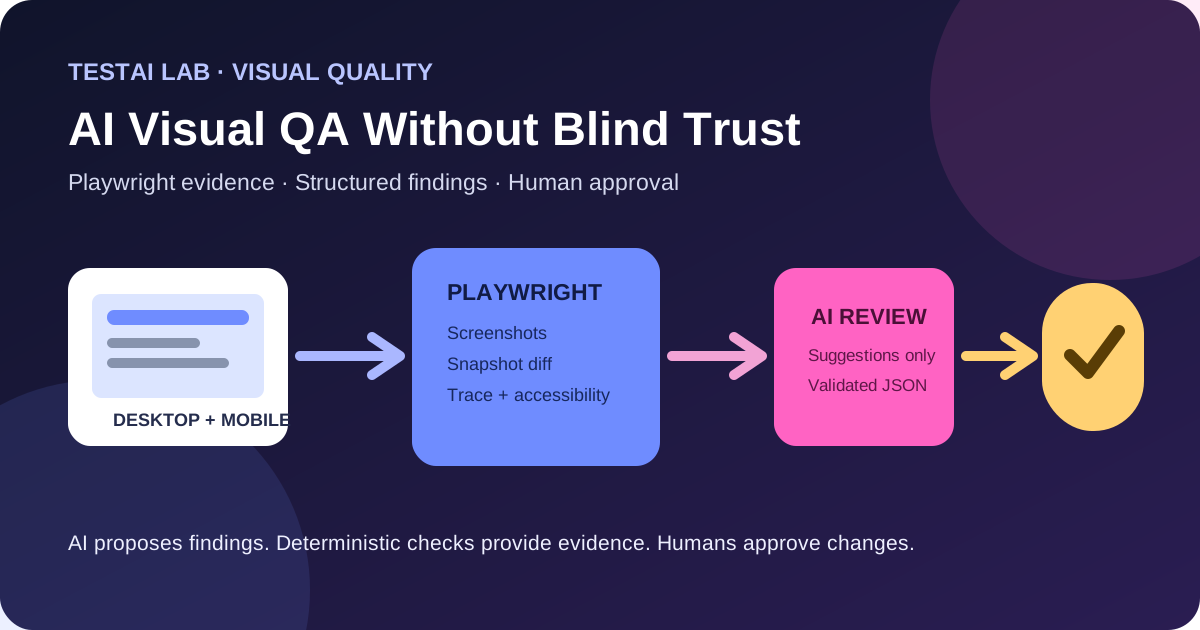
Playwright + optional multimodal review → deterministic checks + human approval
How to augment a classic Playwright visual‑test pipeline with a language‑model that proposes semantic findings, while keeping the baseline‑stable, deterministic core untouched.
1. Why a “review‑only” AI layer makes sense
Visual regression testing with Playwright already gives you pixel‑perfect, repeatable evidence. A screenshot taken under controlled conditions can be compared against a stored baseline, and the test either passes or fails deterministically.
A multimodal model (e.g., a vision‑language model) can add semantic context – it can say “the “Add to cart” button is shifted 12 px to the right” – which is useful when a pixel diff is noisy or when a defect is subtle. However, the model’s output is untrusted data:
- It may hallucinate elements that do not exist.
- Prompt injection can be hidden in page content.
- Cost and rate limits make it unsuitable for bulk baseline updates.
Consequently the AI should be optional, read‑only, and gated by human validation. The deterministic Playwright assertions remain the source of truth; the AI merely surfaces candidate findings that a reviewer can accept, reject, or use to enrich a defect report.
2. End‑to‑end architecture
Stable test data & fonts
        │
        ▼
Playwright (desktop & mobile) → screenshots / accessibility snapshots
        │
        ▼
Deterministic assertions
   – toHaveScreenshot()
   – pixel‑diff thresholds
        │
        ▼
Sanitized copy of the screenshot
        │
        ▼
AI multimodal model (provider‑neutral)
        │
        ▼
Structured candidate findings (JSON)
        │
        ▼
Schema validation + secret‑scrubbing
        │
        ▼
Evidence bundle (original + sanitized + diff)
        │
        ▼
Human reviewer → approve defect OR update baseline
The AI never writes to the baseline or creates a defect automatically; it only contributes a candidate that must be vetted.
3. Building a concrete responsive scenario
Imagine a product‑detail page that must render correctly on a desktop (1440 px) and a mobile viewport (375 px). The page contains:
- A hero image that animates on load.
- A price badge that updates dynamically from an API.
- A “Buy now” button whose label may be localized.
The test goal is to verify layout, typography, and accessibility, while ignoring the animation and the dynamic price.
3.1 Stable test data & fonts
- Static fixtures – mock the API that returns the price so the same value appears in every run.
- Font consistency – install the exact web‑font version on the CI worker (e.g., via
npm i @fontsource/roboto) and setfont-display: swapto avoid fallback flicker.
test.use({
  // Force the same viewport for each project
  viewport: { width: 1440, height: 900 },
  // Load a deterministic font
  launchOptions: {
    args: ['--font-render-hinting=medium'],
  },
});
3.2 Capture deterministic screenshots
Playwright’s snapshot API lets you mask volatile regions and clip to a specific viewport.
test('product page layout – desktop', async ({ page }) => {
  await page.route('**/price', route =>
    route.fulfill({ json: { amount: '19.99', currency: 'USD' } })
  );

  await page.goto('/product/123');
  // Wait for the hero animation to finish
  await page.waitForTimeout(500);

  // Mask the price badge (dynamic) and the loading spinner
  const screenshot = await page.screenshot({
    fullPage: true,
    mask: [
      { css: '.price-badge' },
      { css: '.spinner' },
    ],
  });

  // Deterministic visual assertion
  expect(screenshot).toMatchSnapshot('product-desktop.png', {
    maxDiffPixels: 100, // small tolerance for anti‑aliasing
  });
});
The same test can be run for a mobile project by changing the viewport in the test.use block. Playwright automatically stores the baseline under test-results/<test-name>/snapshots.
3.3 Accessibility snapshot (optional)
Playwright can also capture an accessibility tree that the AI may later reference.
const ax = await page.accessibility.snapshot();
expect(ax).toMatchSnapshot('product-desktop.ax.json');
4. Sanitizing the image before AI consumption
Before sending a screenshot to an external model we must remove any secrets that could be leaked (e.g., auth tokens rendered in a debug overlay). A simple approach is to overlay a solid rectangle over known selectors.
import { sharp } from 'sharp'; // image‑processing library

async function sanitize(imageBuffer: Buffer): Promise<Buffer> {
  const img = sharp(imageBuffer);
  // Example: hide any element with class .debug-token
  const { width, height } = await img.metadata();
  const overlay = Buffer.from(
    `<svg width="${width}" height="${height}">
       <rect x="0" y="0" width="${width}" height="${height}" fill="none"/>
       <rect x="10" y="10" width="200" height="30" fill="#000"/>
     </svg>`
  );
  return img.composite([{ input: overlay, blend: 'dest-in' }]).png().toBuffer();
}
The sanitized copy is the only artifact sent to the AI; the original stays in the test artifact store for audit.
5. Prompt design and rate‑limit awareness
A provider‑neutral prompt should be short, explicit, and avoid embedding page content that could be interpreted as instructions.
You are a QA assistant. Examine the attached screenshot of a product page.
Identify layout anomalies, missing elements, or accessibility concerns.
Return findings in JSON matching the provided schema. Do not modify the image.
Because most vision‑language APIs charge per request and enforce a rate limit, the test harness should:
- Cache AI responses for a given screenshot hash.
- Skip the AI step for unchanged baselines (deterministic pass).
- Log the cost per run for budgeting.
6. Structured candidate findings
A JSON schema makes the AI output machine‑readable and safe to validate before human review.
{
  "$schema": "http://json-schema.org/draft-07/schema#",
  "title": "AI Visual Findings",
  "type": "array",
  "items": {
    "type": "object",
    "required": ["id", "description", "severity", "location", "screenshotRef"],
    "properties": {
      "id": { "type": "string", "format": "uuid" },
      "description": { "type": "string", "minLength": 1 },
      "severity": { "enum": ["info", "low", "medium", "high", "critical"] },
      "location": {
        "type": "object",
        "required": ["selector", "boundingBox"],
        "properties": {
          "selector": { "type": "string" },
          "boundingBox": {
            "type": "object",
            "required": ["x", "y", "width", "height"],
            "properties": {
              "x": { "type": "number" },
              "y": { "type": "number" },
              "width": { "type": "number" },
              "height": { "type": "number" }
            }
          }
        }
      },
      "screenshotRef": { "type": "string", "format": "uri" },
      "confidence": { "type": "number", "minimum": 0, "maximum": 1 }
    }
  }
}
The test runner validates the AI response against this schema (e.g., using ajv). Any deviation is logged and the AI result is discarded.
7. Evidence bundle for the reviewer
When a candidate finding passes schema validation, the system assembles an evidence package:
- Original screenshot (unchanged).
- Sanitized screenshot (sent to AI).
- Diff image generated by Playwright (
expect(...).toMatchSnapshotalready stores a diff PNG). - AI JSON payload.
- Metadata – test name, run ID, viewport, browser version.
All artifacts are uploaded to the CI artifact store (GitHub Actions) and linked from the review UI (e.g., a custom GitHub comment or a ticket in Azure DevOps). The reviewer can see the visual diff, read the AI’s description, and decide:
- Approve defect – create a bug with the AI’s suggestion and attach the diff.
- Reject – mark the AI output as a false positive (helps improve prompt or model).
- Update baseline – only after a manual visual inspection confirms the change is intentional.
Because the AI never writes to the baseline automatically, the deterministic contract of the test suite stays intact.
8. Handling common visual‑test pitfalls
| Issue | Playwright technique | AI‑layer consideration |
|---|---|---|
| Animations | await page.waitForTimeout or animation: none CSS override. | AI should be told to ignore animated regions; mask them if needed. |
| Dynamic regions | mask option in page.screenshot. | Ensure the same mask is applied before the image reaches the model. |
| Viewport coverage | Use fullPage: true for complete capture or clip to a specific area. | The AI schema expects a boundingBox; accurate clipping improves location precision. |
| False positives | Tight maxDiffPixels and threshold settings. | Human review is the final arbiter; keep AI suggestions low‑confidence for optional triage. |
| Accessibility | page.accessibility.snapshot(). | AI can reference the tree to surface missing ARIA labels, but still requires verification. |
9. Security & privacy guardrails
- Secret removal – mask any element that may contain tokens, API keys, or user data before sending the image.
- Prompt injection – never embed raw page text in the prompt; treat page content as data only.
- OWASP guidance – follow the OWASP “Secure Coding Practices” for data sanitization and “Injection” mitigation (OWASP Top 10 A03) when constructing prompts.
- Rate & cost limits – configure a per‑run budget; abort the AI step if the projected cost exceeds the threshold.
These measures keep the AI interaction compliant with typical corporate security policies.
10. Where automation helps
- Deterministic capture – Playwright guarantees the same pixel output when the environment is stable.
- Masking & sanitization – Scripts reliably hide volatile or secret regions, a task that would be error‑prone manually.
- Schema validation – Automated JSON validation prevents malformed AI output from reaching reviewers.
- Diff generation – Playwright’s built‑in diff images give an immediate visual cue that humans can trust.
Automation does not replace the judgment needed to decide whether a visual change is a regression, an intentional redesign, or a false alarm.
11. Sample TypeScript helper that ties everything together
import { test, expect, Page } from '@playwright/test';
import Ajv from 'ajv';
import fetch from 'node-fetch';
import { sanitize } from './sanitize'; // function from §4

const ajv = new Ajv();
const schema = require('./ai-findings-schema.json');
const validate = ajv.compile(schema);

async function runAiReview(
  screenshot: Buffer,
  testInfo: { name: string; runId: string }
): Promise<void> {
  const sanitized = await sanitize(screenshot);
  const response = await fetch('https://api.example.com/vision', {
    method: 'POST',
    headers: {
      Authorization: `Bearer ${process.env.AI_TOKEN}`,
      'Content-Type': 'application/octet-stream',
    },
    body: sanitized,
  });

  if (!response.ok) throw new Error('AI service error');
  const findings = await response.json();

  if (!validate(findings)) {
    console.warn('AI output failed schema validation', validate.errors);
    return;
  }

  // Assemble evidence bundle (simplified)
  const evidence = {
    testName: testInfo.name,
    runId: testInfo.runId,
    screenshotUrl: `artifacts/${testInfo.runId}/original.png`,
    sanitizedUrl: `artifacts/${testInfo.runId}/sanitized.png`,
    diffUrl: `artifacts/${testInfo.runId}/diff.png`,
    findings,
  };

  // Post to a review system – placeholder
  await fetch('https://review.example.com/bundle', {
    method: 'POST',
    headers: { 'Content-Type': 'application/json' },
    body: JSON.stringify(evidence),
  });
}

// Example test that uses the helper
test('product page – mobile layout', async ({ page }, testInfo) => {
  await page.route('**/price', route =>
    route.fulfill({ json: { amount: '19.99', currency: 'USD' } })
  );
  await page.goto('/product/123');
  await page.waitForTimeout(500); // let animation settle

  const screenshot = await page.screenshot({
    fullPage: true,
    mask: [{ css: '.price-badge' }, { css: '.debug-token' }],
  });

  // Deterministic visual assertion
  expect(screenshot).toMatchSnapshot('product-mobile.png', {
    maxDiffPixels: 80,
  });

  // Run optional AI review (non‑blocking)
  await runAiReview(screenshot, {
    name: testInfo.title,
    runId: testInfo.retry ? `${testInfo.project.name}-retry` : testInfo.project.name,
  });
});
The helper never writes to the baseline; it only uploads the evidence bundle for later human inspection.
12. Review questions
- What role does the AI layer play in a Playwright visual‑test pipeline, and why must its output be validated before human review?
- How can you prevent dynamic page elements (e.g., price badges, spinners) from causing false visual diffs?
- Which Playwright API options allow you to mask or clip screenshots, and why is this important for AI safety?
- Describe two security concerns when sending page screenshots to an external model and how you mitigate them.
- Why should the AI never update a visual baseline automatically, even if its confidence score is high?
13. Conclusion
Adding a multimodal AI reviewer to Playwright visual testing can surface semantic insights that raw pixel diffs miss, but the trust boundary must remain clearly defined. By keeping the deterministic Playwright assertions as the source of truth, sanitizing images, enforcing a strict JSON schema, and routing every AI suggestion through a human gate, teams gain the benefits of AI‑assisted triage without sacrificing reliability, security, or cost control. The pattern described here is deliberately optional and reversible—you can enable the AI layer on a per‑project basis, monitor its usefulness, and roll it back without touching the core visual‑test suite.
Sources
- Playwright documentation – Screenshots and visual comparisons: <https://playwright.dev/docs/screenshots>;
- Playwright documentation – Test snapshots and accessibility: <https://playwright.dev/docs/test-snapshots>;
- OWASP Foundation – Injection mitigation (Top 10 A03): <https://owasp.org/www-project-top-ten/>;
Leave a comment
Share your thoughts about the article. No account is required.
Comments
Loading comments…