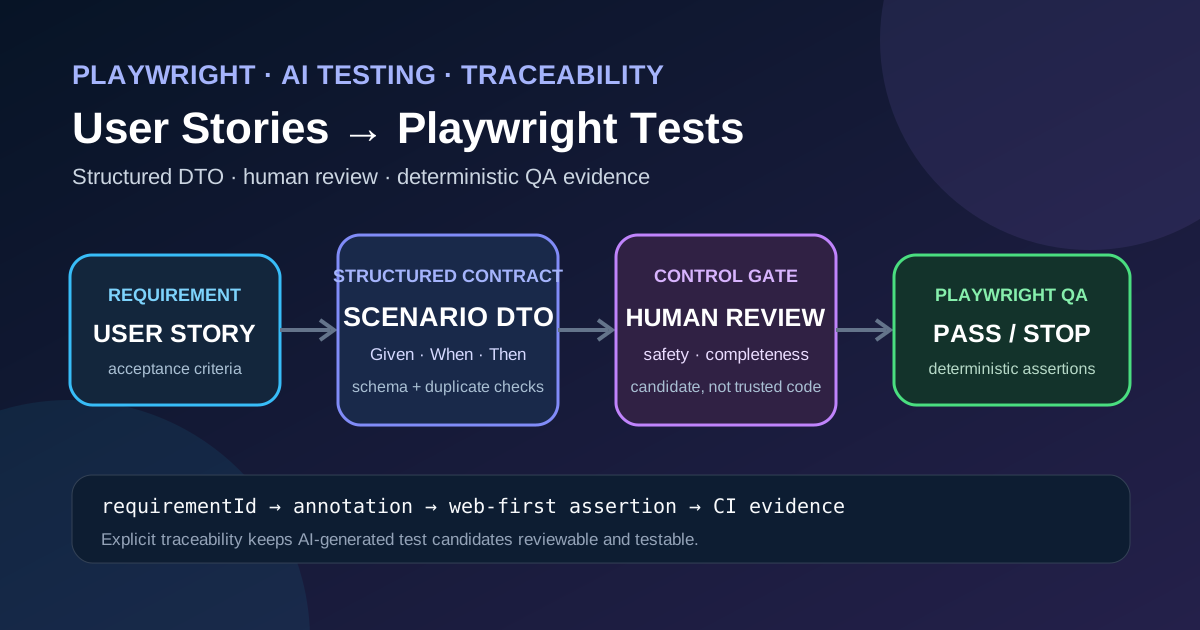
Practical guidance for turning product requirements into reliable automated UI tests while keeping the human in the loop.
1. Introduction
Modern agile teams capture functional intent as user stories and acceptance criteria. The same artifacts can be the source for UI‑level test automation, but the translation is rarely trivial. Large language models (LLMs) can generate candidate Playwright scripts from a normalized description of a story, yet the generated code must never be treated as production‑ready without verification.
This article outlines a repeatable, traceable flow that:
- Normalizes a user story into a structured test‑scenario DTO.
- Feeds the DTO to an LLM that returns a candidate Playwright test.
- Applies human review, deterministic assertions, and metadata annotations that bind the test back to the original requirement ID.
- Publishes the result to CI where the test acts as evidence, not as a decision maker.
All steps are described with concrete TypeScript snippets, a JSON schema for the DTO, and practical QA guardrails such as duplicate‑scenario detection, prompt‑injection isolation, and a checklist for release approval.
2. The End‑to‑End Flow
User Story + Acceptance Criteria
          │
          ▼
Normalized Requirement (JSON)
          │
          ▼
Test‑Scenario DTO (structured)
          │
          ▼
LLM Prompt → Candidate Playwright Test (TS)
          │
          ▼
Human Review (review gate)
          │
          ▼
Annotated Playwright Test (tags, deterministic assertions)
          │
          ▼
CI Execution → Pass/Fail evidence
          │
          ▼
Regression Impact analysis
Each arrow represents a hand‑off that is deliberately documented. The only artifact that moves automatically between stages is the DTO – a machine‑readable representation that can be validated, versioned, and compared against previous runs.
3. Normalizing the User Story
A raw story such as
> “As a shopper I want to add a product to the cart so that I can purchase it later.”
must be stripped of narrative fluff and expressed in a canonical JSON format. The normalization step is performed by a small internal script (or a trusted LLM with a fixed prompt) that extracts:
- Requirement ID – e.g.,
REQ‑1234. - Feature –
Shopping Cart. - Scenario – a short title, e.g.,
Add product to cart. - Given / When / Then clauses that mirror the acceptance criteria.
- Risk tags –
high‑value,auth‑required, etc.
Example normalized output:
{
  "requirementId": "REQ-1234",
  "feature": "Shopping Cart",
  "scenarioId": "SCN-001",
  "title": "Add product to cart",
  "given": [
    { "type": "state", "description": "User is logged in", "role": "shopper" }
  ],
  "when": [
    { "action": "click", "target": "button[data-test='add-to-cart']", "productId": "123" }
  ],
  "then": [
    { "assertion": "cartContains", "productId": "123", "quantity": 1 }
  ],
  "risk": ["high-value"]
}
The JSON schema that validates this structure is shown later in the article.
4. Generating a Test‑Scenario DTO
The DTO is the contract between the requirements team and the AI code generator. It contains only the data needed to produce a deterministic test case. A minimal schema (compatible with JSON Schema Draft‑07) looks like this:
{
  "$schema": "http://json-schema.org/draft-07/schema#",
  "title": "Playwright Test Scenario DTO",
  "type": "object",
  "required": ["requirementId","scenarioId","title","given","when","then"],
  "properties": {
    "requirementId": { "type": "string" },
    "scenarioId": { "type": "string" },
    "title": { "type": "string" },
    "given": {
      "type": "array",
      "items": { "$ref": "#/definitions/step" }
    },
    "when": {
      "type": "array",
      "items": { "$ref": "#/definitions/step" }
    },
    "then": {
      "type": "array",
      "items": { "$ref": "#/definitions/assertion" }
    },
    "risk": {
      "type": "array",
      "items": { "type": "string" }
    }
  },
  "definitions": {
    "step": {
      "type": "object",
      "required": ["action","target"],
      "properties": {
        "action": { "type": "string" },
        "target": { "type": "string" },
        "description": { "type": "string" },
        "productId": { "type": "string" }
      }
    },
    "assertion": {
      "type": "object",
      "required": ["assertion"],
      "properties": {
        "assertion": { "type": "string" },
        "productId": { "type": "string" },
        "quantity": { "type": "integer" }
      }
    }
  }
}
The schema is used for validation before the DTO reaches the LLM. Invalid payloads are rejected early, preventing malformed prompts that could lead to ambiguous code.
5. Prompt‑Injection Isolation
Because the DTO originates from a non‑trusted source (the product backlog), the prompt that feeds the LLM must be sandboxed:
- The DTO is stringified and inserted into a fixed‑position placeholder inside a template.
- The template never interpolates free‑form text; only the JSON fields are allowed.
- The LLM request is sent over a dedicated API key with a rate limit that isolates it from other services.
If the DTO contains malicious payloads (e.g., a given description that includes code), the JSON schema will reject it, and the isolation layer will escape any stray characters before they reach the LLM. This approach mitigates classic prompt‑injection attacks while keeping the workflow fast.
6. Candidate Playwright Test (Generated)
Below is a representative TypeScript snippet that an LLM might produce from the DTO above. The code is not assumed to be correct until a human reviewer signs off.
import { test, expect } from '@playwright/test';

// Traceability tags – Playwright supports custom annotations
test.describe.configure({ mode: 'parallel' });

test('REQ-1234 SCN-001 Add product to cart', async ({ page }) => {
  // Tag the test with requirement metadata
  test.info().annotations.push({ type: 'requirement', description: 'REQ-1234' });
  test.info().annotations.push({ type: 'scenario', description: 'SCN-001' });

  // GIVEN – user is logged in
  await page.goto('https://example.com/login');
  await page.fill('#username', 'shopper@example.com');
  await page.fill('#password', 'securePass!');
  await page.click('button[type="submit"]');
  await expect(page).toHaveURL(/.*dashboard/);

  // WHEN – click add‑to‑cart button for product 123
  await page.goto('https://example.com/product/123');
  await page.click('button[data-test="add-to-cart"]');

  // THEN – cart must contain the product (deterministic oracle)
  await page.goto('https://example.com/cart');
  const cartItem = page.locator('li[data-test="cart-item-123"]');
  await expect(cartItem).toBeVisible();
  await expect(cartItem).toHaveText(/Quantity:\s*1/);
});
Key points:
- Annotations (
requirement,scenario) preserve traceability in test reports. - Web‑first assertions (
await expect(page).toHaveURL,await expect(cartItem).toBeVisible) are deterministic because they wait for the UI to reach a stable state before evaluating the condition, as described in the Playwright documentation on assertions and test annotations. - The test does not contain any hard‑coded secrets; credentials are supplied via environment variables in the CI pipeline (not shown here).
7. Human Review and Review Gates
The candidate test is routed to a review board that checks:
- Semantic fidelity – Does the test exercise the exact acceptance criteria?
- Safety – No accidental data deletion, no hard‑coded secrets.
- Completeness – Are negative paths, boundary values, and cleanup steps present?
- Determinism – All assertions rely on Playwright’s waiting mechanisms; no flaky
setTimeouthacks.
A review gate can be enforced in CI by requiring a signed‑off Git commit (e.g., a Signed-off-by: line) before the test is merged into the automation branch. Automated linting can also verify that required annotations exist.
8. Deterministic Oracles with Web‑First Assertions
Playwright’s web‑first assertions automatically poll the DOM until the expected condition is met or a timeout expires. This behavior eliminates the need for manual sleeps and reduces flakiness. In the example above:
await expect(page).toHaveURL(/.*dashboard/)waits for navigation to complete.await expect(cartItem).toBeVisible()waits until the element appears, guaranteeing that the subsequenttoHaveTextcheck runs on a stable element.
Because the assertions are built‑in to Playwright, they are part of the documented behavior (see Playwright test assertions) and can be relied upon as deterministic oracles for regression evidence.
9. Preserving Traceability with Tags and Annotations
Playwright allows custom annotations that appear in test reports and can be filtered in the command line (--grep @requirement=REQ-1234). A typical pattern:
test('Add product to cart', async ({ page }) => {
  test.info().annotations.push({ type: 'requirement', description: 'REQ-1234' });
  test.info().annotations.push({ type: 'risk', description: 'high-value' });
  // test body …
});
These annotations enable:
- Bidirectional traceability – From a requirement you can locate all generated tests, and from a failing test you can instantly see the impacted requirement ID.
- Selective execution – During a hot‑fix sprint, only tests annotated with a specific risk tag can be run.
The practice of embedding requirement IDs directly in the test name (REQ-1234 SCN-001 …) further reinforces traceability for teams that rely on naming conventions.
10. Adding Missing Test Dimensions
AI‑generated candidates typically cover the happy path only. The QA team must explicitly add:
- Negative cases – e.g., attempting to add an out‑of‑stock product and asserting the error toast.
- Boundary values – e.g., adding the maximum allowed quantity and verifying the limit.
- Authorization checks – confirming that a guest user cannot add to cart.
- Data setup – seeding the product catalog with the required
productIdbefore the test runs. - Cleanup – removing the item from the cart after verification to keep the environment pristine.
- Regression impact – documenting whether the scenario touches shared components (search, checkout) that could cause cascading failures.
These additions are manual but can be templated. For example, a “negative‑path” template can be applied automatically to every generated test, prompting the reviewer to fill in the specific error condition.
11. Duplicate and Contradiction Checks
Before a DTO is sent to the LLM, the repository of existing scenarios is scanned:
- Duplicate detection – two DTOs with identical
given/when/thensequences are flagged. The system suggests merging or renaming. - Contradiction detection – if one scenario asserts
cartContains(productId=123, quantity=1)while another assertsquantity=0for the same pre‑condition, a warning is raised.
These checks rely on simple structural hashing of the when and then arrays and can be run as a pre‑commit hook.
12. Safe Logging and Evidence Capture
During CI execution:
- Test logs are stripped of any request payloads that might contain PII. Only the requirement ID and outcome are persisted.
- Screenshots on failure are stored in an artifact bucket with a naming convention that includes the requirement ID (
REQ-1234_failure.png). - JUnit XML reports include the custom annotations, allowing downstream dashboards to correlate failures with business requirements.
The logs become evidence for release decisions, but the decision itself remains a human judgment based on the deterministic pass/fail result.
13. Review Checklist
A concise checklist that the reviewer signs off before merging the test:
- [ ] DTO validates against the JSON schema.
- [ ] Requirement ID and scenario ID appear in test name and annotations.
- [ ] All
givensteps are reproducible in the test environment (no hard‑coded URLs). - [ ] Assertions use Playwright’s built‑in
expectmethods (no manual sleeps). - [ ] Negative, boundary, and authorization cases are added where risk dictates.
- [ ] Data setup and cleanup are explicit and idempotent.
- [ ] No secret values are hard‑coded; environment variables are used instead.
- [ ] Duplicate or contradictory scenarios have been resolved.
- [ ] Safe logging configuration is enabled in the CI job.
Only after every box is checked does the test move to the automation branch.
14. Where Automation Helps
- Prompt generation – Using a fixed template to turn a validated DTO into a prompt eliminates ad‑hoc prompt engineering.
- Schema validation – Automated JSON‑schema checks catch malformed requirements before they reach the LLM.
- Duplicate detection – A lightweight script can flag redundant scenarios early, reducing maintenance overhead.
- CI execution – Playwright’s parallel test runner and built‑in reporters provide fast feedback on deterministic oracles.
Automation does not replace human judgment for:
- Deciding whether a generated test truly reflects the business intent.
- Adding risk‑based negative paths that require domain knowledge.
- Evaluating the impact of a failure on release readiness.
The balance is a human‑in‑the‑loop pipeline where AI accelerates scaffolding while QA owns the final quality gate.
15. Review Questions
- How does embedding requirement IDs in Playwright annotations improve traceability?
- What safety measures prevent prompt‑injection when feeding a DTO to an LLM?
- Why are Playwright’s web‑first assertions considered deterministic oracles?
- List three test dimensions that must be added manually after AI generation.
- What role does duplicate detection play in maintaining a clean test suite?
16. Conclusion
Transforming user stories into Playwright tests with AI can dramatically shorten the time from requirement to automated verification. The key to a reliable pipeline is explicit traceability, deterministic assertions, and a human‑centric review gate that treats generated code as a candidate, not as a final artifact. By normalizing stories into a validated DTO, isolating prompts, tagging tests with requirement metadata, and supplementing the happy‑path script with negative, boundary, and cleanup logic, teams gain reproducible CI evidence while keeping release decisions firmly under human control.
Sources
- Playwright documentation – Test annotations: https://playwright.dev/docs/test-annotations
- Playwright documentation – Test assertions: https://playwright.dev/docs/test-assertions
Leave a comment
Share your thoughts about the article. No account is required.
Comments
Loading comments…