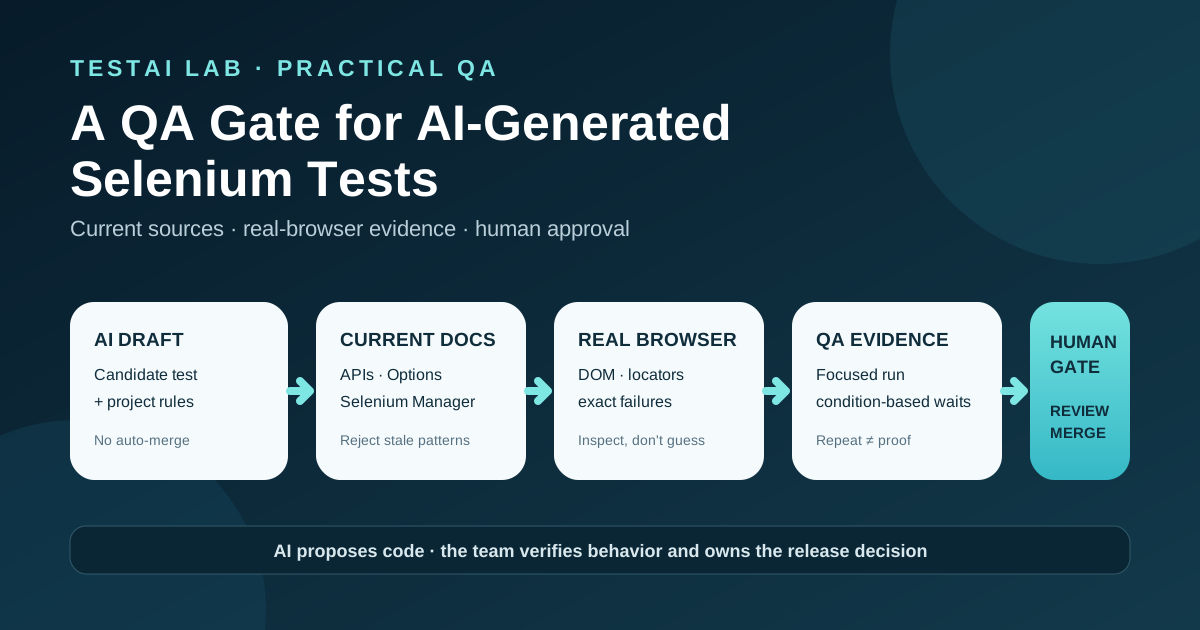
AI can draft a Selenium test quickly. A QA gate decides whether that draft is current, observable, repeatable enough to review, and safe to merge.
Why AI-generated Selenium needs its own review gate
Selenium's current guidance identifies a recurring problem: coding agents often reproduce Selenium 2 or Selenium 3 patterns because old tutorials still dominate their training material. Typical output includes a third-party driver manager, a hard-coded driver path, removed find_element_by_* helpers, DesiredCapabilities, absolute XPath, or a fixed sleep.[1][2]
These problems are not evidence that AI must be excluded from test automation. They are evidence that generated code needs the same onboarding rules, current documentation, execution evidence, and human review that a new contributor would receive.
The gate described below is a TestAI Lab recommendation, not a Selenium product feature. Official Selenium documentation supplies the current technical rules. The team owns the acceptance criteria and the merge decision.
What should fail review immediately
| Generated pattern | Review decision | Current direction |
|---|---|---|
webdriver-manager or a downloaded driver path | Reject unless the project documents a specific exception | Selenium Manager ships with Selenium and is used by the bindings for automated driver management.[1][3] |
DesiredCapabilities or free-form capability maps for new code | Reject | Configure the browser through its Options class.[1] |
find_element_by_id or another find_element_by_* helper | Reject | Use driver.find_element(By.ID, "...") or another By strategy.[1] |
time.sleep(...) used to synchronize the test | Reject | Wait for the concrete condition that must become true.[1][2][4] |
| Absolute XPath copied from DevTools | Reject | Inspect the real DOM and select the most stable available locator, preferably an application-owned test attribute or another durable identifier.[1][2] |
| CDP code presented as a cross-browser default | Reject or narrow the scope explicitly | Prefer standards-based WebDriver BiDi where the required feature is supported by the current browser, binding, and Selenium version.[1][5] |
| A locator invented without inspecting the application | Reject | Let the agent inspect the real page or run a throwaway discovery script, then review the proposed locator.[1][2] |
A pattern can compile and still be the wrong choice. The gate therefore checks both syntax and engineering intent.
Put the rules where the agent can read them
Selenium recommends keeping project conventions in AGENTS.md, CLAUDE.md, or the rules file used by the coding tool.[1] The version and commands must match the actual repository.
A compact starting point could be:
## Browser automation

- Use the Selenium version pinned by this repository.
- Consult https://www.selenium.dev/llms.txt and current Selenium documentation.
- If an API is absent from the current documentation or API reference, do not use it.
- Do not add third-party driver managers or hard-coded driver paths.
- Configure browsers through Options.
- Use By locators verified against the real DOM; do not use absolute XPath.
- Do not use fixed sleeps for synchronization. Wait for the required condition.
- Run the focused test and attach the exact exception and a screenshot when it fails.
- Always quit the driver in teardown.
- Never put credentials or personal production data in code, prompts, logs, or screenshots.
This is a policy example, not a generated framework. Adapt it to the language binding, test runner, browsers, and commands that the project really uses.
The gate: from request to merge evidence
1. Define the test contract
Before asking an agent to write code, specify:
- the user-visible behavior to verify;
- the supported browser and environment;
- the preconditions and test data;
- the expected result;
- the permitted source of credentials;
- the command for one focused test;
- the evidence required on failure.
Input: a test objective plus repository rules. Output: a reviewable scenario with an observable expected result.
If the expected result is vague, generated assertions will also be vague.
2. Verify every unfamiliar API against current sources
Provide the agent with Selenium's llms.txt, current documentation, API reference, and runnable examples. Selenium explicitly advises treating an API that cannot be found in current documentation or the API reference as nonexistent.[1][2]
The reviewer should check:
- imports and method names;
- driver creation;
- browser options;
- locator APIs;
- wait conditions;
- teardown;
- any logging, network, or BiDi feature against the relevant binding and version.
Do not rely on a plausible explanation from the model as evidence.
3. Inspect the real application before accepting locators
An agent that cannot see the page must guess. Give it access to a safe test environment or let it run a throwaway Selenium discovery script. Review candidate elements before the final test is written.[1][2]
A useful locator review asks:
- Is the element unique at the moment of interaction?
- Is the attribute controlled by the application or generated by a framework?
- Can localization change the visible text?
- Is the element inside an iframe, shadow root, dialog, or overlay?
- Does the locator still identify the intended element after the page updates?
The browser session must not expose production credentials, customer data, session tokens, or private identifiers.
4. Prefer a condition over a delay
A fixed sleep guesses how long the application needs. An explicit wait describes the state the test needs. Selenium also warns against mixing implicit and explicit waits because the resulting timeout can be unpredictable.[4]
The following Python example uses current Selenium APIs. The URL and data-testid values are illustrative and must be verified against the real application.
from selenium import webdriver
from selenium.webdriver.common.by import By
from selenium.webdriver.support.ui import WebDriverWait
from selenium.webdriver.support import expected_conditions as EC


driver = webdriver.Chrome()
try:
    driver.get("https://app.example.test/login")

    wait = WebDriverWait(driver, 10)
    submit = wait.until(
        EC.element_to_be_clickable(
            (By.CSS_SELECTOR, "[data-testid='login-submit']")
        )
    )

    assert submit.is_displayed()
finally:
    driver.quit()
The important question is not whether ten seconds is universally correct. It is whether the selected condition represents the user-visible state the scenario requires and whether the project has a justified timeout policy.
5. Run one focused test and preserve failure evidence
Selenium's workflow recommends running the new test by itself before running the suite.[1] If it fails, give the agent the exact exception rather than a summary such as “the test failed.” A screenshot at the time of failure can reveal an overlay, cookie banner, unexpected dialog, or intercepted click.[1][2]
Recommended gate outputs are team-defined artifacts such as:
- focused test command and exit status;
- browser, Selenium, and binding versions;
- exact exception and stack trace;
- screenshot on failure;
- relevant application and WebDriver logs with secrets redacted;
- the code diff.
These names and formats are not mandated by Selenium. Choose formats your CI system can retain and reviewers can read.
6. Repeat to look for races, not to prove perfection
Selenium advises running the focused test several times before trusting it; one pass does not show that the test is race-free.[1] The number of repetitions should be set by the team according to risk and runtime.
Record:
- how many runs were attempted;
- pass and failure counts;
- duration distribution;
- exception types;
- whether failures cluster around one condition or browser.
Do not require identical full-page DOM hashes. Modern pages can contain timestamps, randomized IDs, analytics markup, and asynchronous content. Compare the business assertion and selected stable evidence instead.
Several successful runs increase confidence but never prove that a test is flake-free.
7. Review the diff and make the human decision
The final reviewer checks both the code and the evidence:
- no obsolete Selenium APIs;
- no third-party driver manager without a documented reason;
- no fixed sleep used for synchronization;
- no absolute XPath;
- locators verified in the real application;
- waits mapped to meaningful conditions;
- driver session closed with
quit(); - exact failures preserved;
- no secrets or personal data in code, logs, screenshots, or prompts;
- cross-browser claims supported by actual executed browsers;
- BiDi or CDP usage limited to documented support for the chosen version and binding;
- assertions verify the intended behavior, not merely the presence of an element.
Only a human owner changes the decision from needs work to approved for merge.
Architecture and data flow
| Stage | Input | Primary check | Output |
|---|---|---|---|
| Test contract | Requirement, risk, environment | Expected behavior is observable | Scenario and acceptance evidence |
| Agent context | Contract, rules file, current docs | Version and conventions are explicit | Candidate code |
| Browser discovery | Safe test environment | Locators match the real DOM | Reviewed locator set |
| Focused execution | Candidate test | One scenario runs with real assertions | Exit status and failure artifacts |
| Repeatability check | Focused command | Intermittent failures are recorded | Run summary |
| Human review | Diff plus evidence | Technical, security, and product intent | Merge decision |
| CI | Approved test | Repository quality gates | Auditable result |
A failed stage returns evidence to the author. It does not trigger an automatic timeout increase or a sleep insertion.
Positive, negative, and regression checks for the gate
Test the gate itself. Useful scenarios include:
Positive checks
- Current
webdriver.Chrome()initialization is accepted. - A verified
Bylocator and explicit condition pass policy review. - A failure produces a redacted exception and readable screenshot.
- The focused command and browser version are recorded.
Negative checks
webdriver_manager,executable_path,DesiredCapabilities,find_element_by_*, fixed sleeps, and absolute XPath are detected.- A missing
driver.quit()is reported. - A placeholder locator that was never checked against the application is rejected.
- A log or screenshot containing a seeded fake secret causes the artifact check to fail.
- A Chromium-only CDP call cannot be described as cross-browser evidence.
Repeatability checks
- The same focused scenario can be executed repeatedly without accumulating sessions or test data.
- A deliberately delayed element produces a useful condition-specific failure.
- The report preserves differences between browsers instead of flattening them into one “passed” result.
Use synthetic credentials and non-production data for these tests.
Security and test-data boundaries
AI prompts and browser artifacts can leak more than source code. Apply these controls:
- reference secrets through the CI secret store or environment variables;
- keep secret values out of prompts;
- use dedicated test accounts with minimal permissions;
- redact authorization headers, cookies, tokens, email addresses, and customer identifiers;
- review screenshots before retention;
- define retention and access rules for logs and screenshots;
- prevent the agent from changing production data unless the scenario explicitly authorizes a safe test action.
A regex secret scan is useful but not sufficient. Human review is still required because sensitive business data may not resemble a token.
WebDriver BiDi: verify support, do not assume it
WebDriver BiDi is the W3C bidirectional protocol intended as the cross-browser replacement for Chrome DevTools Protocol. Selenium documentation covers logging, network, and script features and notes that CDP support is temporary while BiDi is implemented.[5]
That direction does not guarantee that every desired feature is available in every browser and language binding today. Before approving BiDi-dependent code:
- check the current Selenium documentation for the exact feature;
- check the project's Selenium and browser versions;
- run the behavior on each browser claimed by the test;
- keep a documented fallback or narrow the supported scope.
The gate should reject unsupported certainty, not experimentation.
Definition of Done
An AI-generated Selenium test is ready for merge when:
- [ ] The scenario and expected result are explicit.
- [ ] The repository rules point to current Selenium sources.
- [ ] Every unfamiliar API was verified against current documentation or the API reference.
- [ ] The locator was checked against the real test application.
- [ ] Synchronization waits for a meaningful condition; no fixed sleep hides a race.
- [ ] One focused test ran and produced inspectable evidence.
- [ ] Repeated runs were recorded as confidence evidence, not proof.
- [ ] The exact exception and screenshot are available for failures.
- [ ] Teardown ends the driver session.
- [ ] Secrets and personal data are absent from code and retained artifacts.
- [ ] Browser and cross-browser claims match executed evidence.
- [ ] A human reviewer approved the diff and the product assertion.
Conclusion
The safe way to use an AI coding agent with Selenium is not to trust or reject it by default. Give it the current documentation, explicit repository rules, and access to a safe real browser. Then require focused execution, failure evidence, repeatability observations, and a human merge decision.
This gate catches the legacy patterns that look plausible, compile locally, and later become flaky maintenance debt. More importantly, it keeps responsibility where it belongs: AI proposes code; the team verifies behavior and owns the release decision.
Sources
- Selenium documentation — Using AI coding agents with Selenium
- Selenium blog — Your Agent Learned Selenium From My Old Blog Posts
- Selenium documentation — Selenium Manager
- Selenium documentation — Waiting Strategies
- Selenium documentation — WebDriver BiDi
Leave a comment
Share your thoughts about the article. No account is required.
Comments
Loading comments…